Digital Marketing
How to Allocate Campaign Budgets for Meta Ads
Step-by-step plan to allocate and scale Meta Ads budgets with CBO, 70-20-10 and funnel splits, monitoring, creative refreshes, and seasonal tuning.

Mismanaging your Meta Ads budget can waste up to 40% of your spend. Here's how to fix it:
Focus on Goals: Define clear objectives (e.g., sales, leads, or brand awareness) and track related KPIs like ROAS, CPA, or CTR.
Smart Budget Split: Use frameworks like 70-20-10 (70% proven campaigns, 20% for optimization, 10% for testing) or allocate 60% to prospecting, 30% to retargeting, and 10% to experiments.
Leverage Automation: Meta's Campaign Budget Optimization (CBO) dynamically shifts funds to high-performing ad sets, boosting efficiency.
Scale Gradually: Increase budgets by no more than 20% every 2-3 days to avoid disrupting performance.
Monitor & Adjust: Regularly review campaign performance, reallocate funds to top performers, and address audience saturation or creative fatigue.
Key Tip: Avoid sudden changes to budgets, targeting, or creative. Instead, rely on data and incremental adjustments to maximize results. Proper budget allocation can help you scale your revenue and profits while elevating your ROAS by 20-30%.
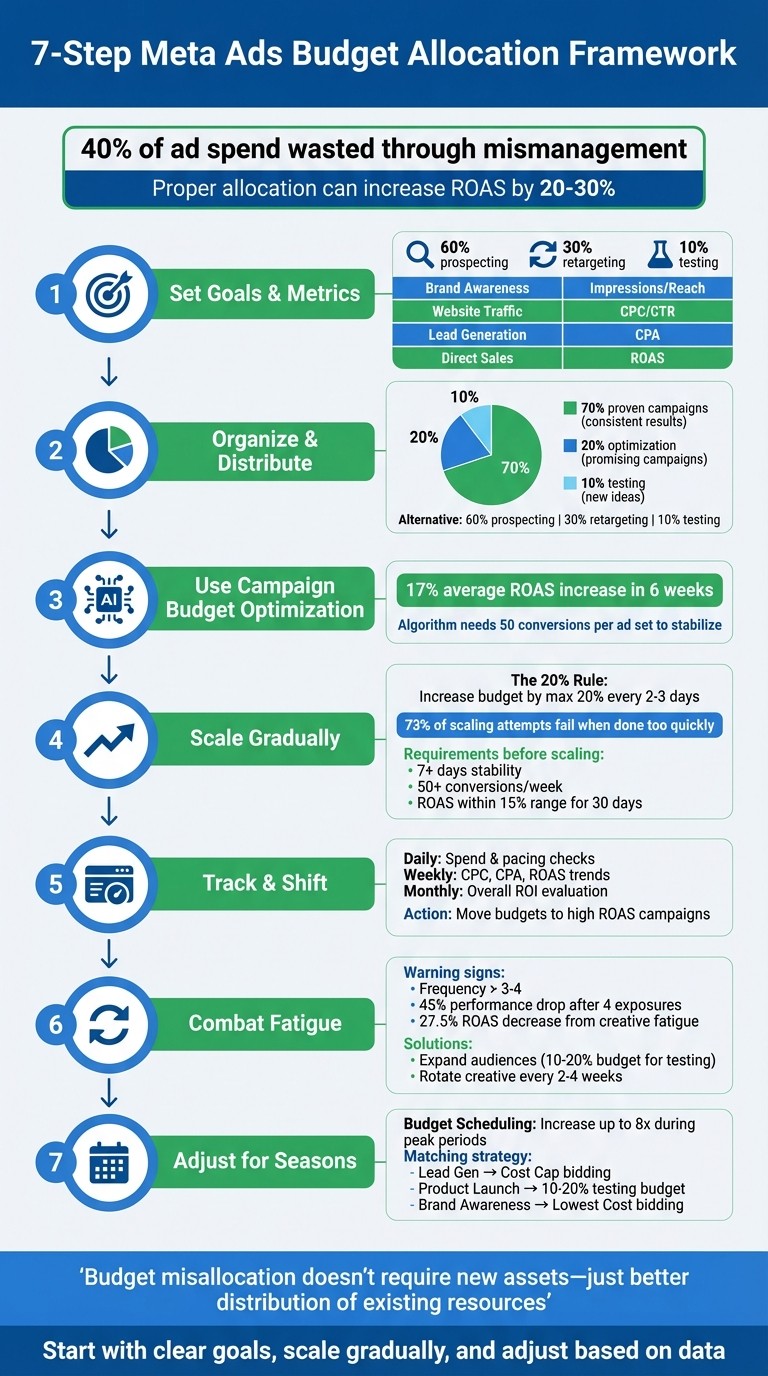
7-Step Meta Ads Budget Allocation Framework
Step 1: Set Your Campaign Goals and Metrics
Before diving into ad spend, it's crucial to define your campaign's purpose. Your objective determines how Meta's delivery system allocates your budget across ad sets [7][1]. Without clear goals, the algorithm struggles to pinpoint the users who can deliver the ROI you're aiming for [5][7].
Choose Your Primary Objectives
Build your campaigns around what matters most to your business. Are you looking to attract new customers, re-engage with warm audiences, or test new creative ideas? Each of these goals demands a different approach to budgeting [2].
For instance, brand awareness campaigns often require bigger budgets spread across multiple placements to maximize reach. On the other hand, lead generation campaigns benefit from focused spending and precise demographic targeting [4].
A common budget breakdown is:
60% for prospecting: Bringing in fresh leads.
30% for retargeting: Nurturing warm audiences.
10% for testing: Trying out new ideas.
This balance helps you continuously bring new prospects into your funnel while maintaining relationships with existing audiences and experimenting with untapped opportunities.
Pick the Right KPIs to Track
Once your goals are set, it's time to align your KPIs (key performance indicators) with those objectives. Each campaign type has specific metrics to focus on:
ROAS (Return on Ad Spend) for direct sales campaigns.
CPA (Cost Per Acquisition) for lead generation efforts.
CPC (Cost Per Click) or CTR (Click-Through Rate) for traffic-driven campaigns [4][2].
When using Advantage+ budgeting, evaluate performance at the campaign level instead of drilling down into individual ad sets [5][1].
Campaign Objective | Primary KPI | Recommended Strategy |
|---|---|---|
Brand Awareness | Impressions / Reach | Broad audience, multiple placements [4] |
Website Traffic | CPC / CTR | High-volume placements, broad targeting [4] |
Lead Generation | CPA | Precise targeting, concentrated budget [4] |
Direct Sales | ROAS |
Set performance thresholds from the start. For example, if your target CPA is $50, implement automated rules to pause campaigns if costs exceed 200% of that target for three consecutive days [2]. This approach ensures you avoid overspending on campaigns that aren't performing while redirecting resources to those that deliver results. These metrics will guide how you allocate your budget moving forward.
Step 2: Organize Campaigns and Distribute Budgets
Setting up your campaigns thoughtfully ensures Meta's algorithm works in your favor while avoiding internal competition. This step builds on the campaign objectives and KPIs you established earlier [2].
Use the 70-20-10 Budget Framework
The 70-20-10 framework provides a straightforward way to allocate your budget effectively. Here's how it breaks down:
70% for campaigns that consistently deliver results.
20% for campaigns with potential but need optimization.
10% for testing new ideas [10].
Let’s dig into each category. The 70% allocation goes to campaigns that meet your target ROAS (Return on Ad Spend) or CPA (Cost Per Acquisition). These campaigns are your revenue generators, featuring proven creative, reliable audiences, and stable performance over at least 30 days. If you're using Advantage+ campaign budget (CBO), Meta automatically reallocates funds to the best-performing ad sets in this category [6].
The 20% growth bucket focuses on campaigns that are promising but need fine-tuning. For example, you might have a strong click-through rate but weak conversions, or the audience targeting is good, but the creative could use improvement. This is the space for refining strategies, experimenting with placements, or tweaking bidding approaches.
The final 10% is reserved for bold experimentation. Use this portion to try out new audience segments, creative formats, or campaign objectives. Pay attention to signals like the "Limited by Budget" status, which indicates that a campaign is running out of funds too early in the day. If this happens, consider reallocating budget from your testing pool to better-performing campaigns to capture those missed evening conversions [2].
Allocate Budgets by Funnel Stage
Beyond the 70-20-10 framework, you should also align your budget with the stages of the customer journey. Alternatively, you can distribute budgets by funnel stage: 60% for prospecting, 30% for retargeting, and 10% for testing [2].
Prospecting campaigns, which target cold audiences unfamiliar with your brand, usually need the largest share. These campaigns require broader reach and more time to show results. Retargeting campaigns, on the other hand, focus on smaller, warm audiences - people who’ve visited your website, watched your videos, or engaged with your content. These tend to convert at higher rates with less spend [2].
When using CBO, group ad sets with similar audience sizes and set daily budgets between $5–$10 to ensure adequate delivery [5] [2]. For instance, if one ad set targets 50,000 people and another targets 5 million, Meta's algorithm will favor the larger audience, even if performance metrics differ [5]. Be cautious not to over-invest in retargeting - if it accounts for more than 45% of your budget, you may be neglecting opportunities to attract new customers [2].
Step 3: Use Meta's Campaign Budget Optimization
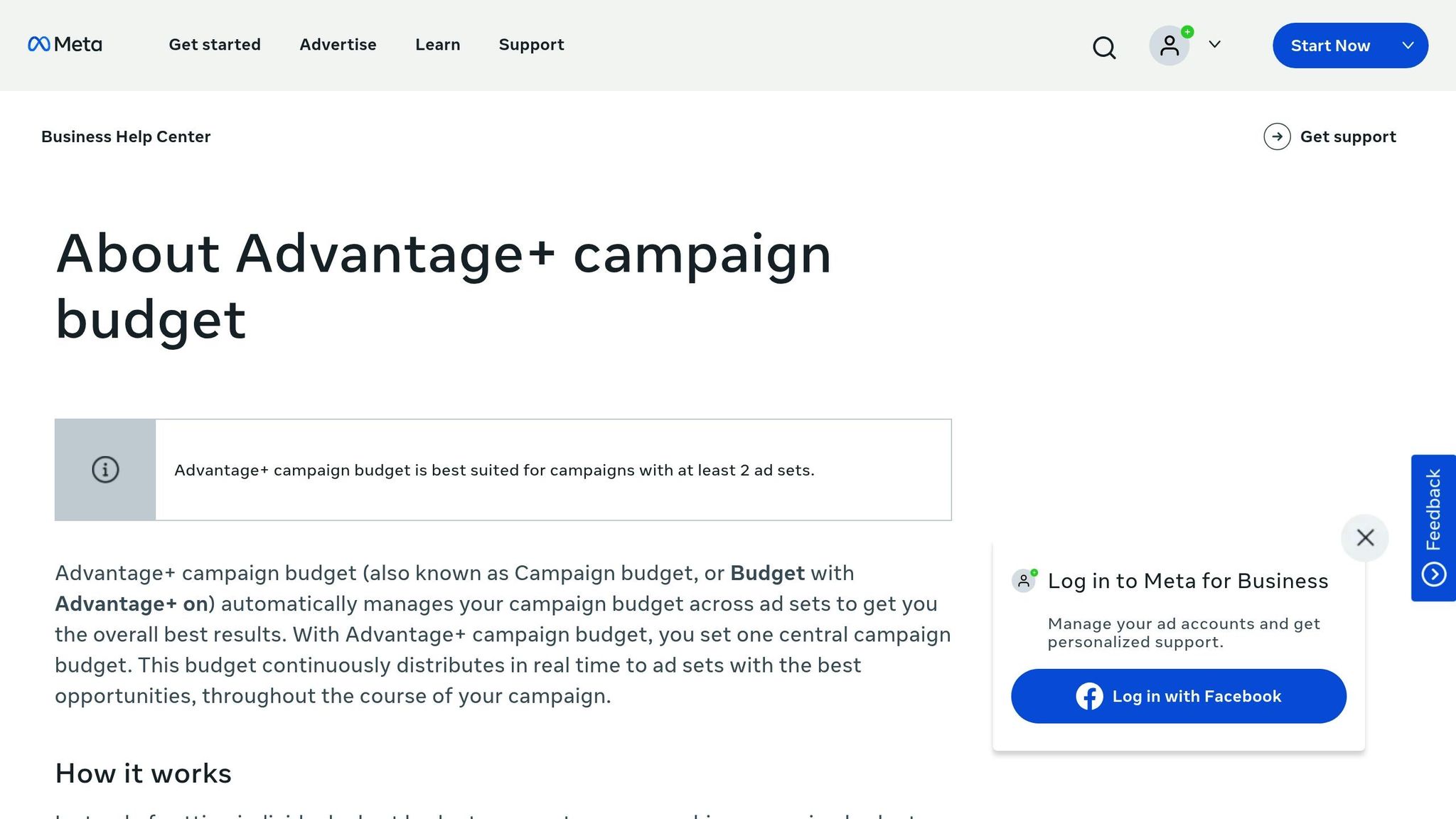
Meta's Campaign Budget Optimization (now called Advantage Campaign Budget) simplifies how budgets are managed by automating their distribution. Using advanced algorithms, Meta assesses ad performance in real time and reallocates funds to the ad sets that deliver the best outcomes. Instead of splitting the budget equally, this approach prioritizes overall campaign results [12][8][5][11].
"Campaign Budget Optimization automatically shifts your daily or lifetime budget among ad sets in real time. Instead of guessing which audience deserves more money, Facebook's delivery system places higher bids where it predicts stronger results." - LeadEnforce [13]
For instance, if one ad set achieves a lower cost per conversion, Meta's system may allocate a larger share of the budget to that ad set. According to Meta's internal data from April 2025, advertisers who adopted CBO reported an average 17% increase in ROAS within just six weeks [13].
How Campaign Budget Optimization Works
CBO sets the budget at the campaign level rather than for individual ad sets. Meta's system then dynamically adjusts the allocation based on where it forecasts the best performance. On days with greater opportunities, the system may spend up to 75% more than your daily budget, provided the weekly average stays within seven times the daily budget [5].
During the initial "learning phase", the algorithm stabilizes after gathering around 50 conversions per ad set [5][12]. Larger audience sizes tend to receive more of the budget, as they offer more opportunities for conversions [5][11].
How to Structure CBO Campaigns
To make the most of CBO, structure your campaigns with ad sets that have similar audience sizes, the same optimization goals, and consistent bid strategies [14][11]. Each campaign should include at least two ad sets. For example, if your goal is conversions, all ad sets within the campaign should focus on conversions, not a mix of actions like link clicks and purchases.
Avoid setting minimum or maximum spend limits at the ad set level. These constraints can hinder the system's ability to allocate the budget effectively [14][11]. Instead, measure success based on total campaign performance, such as the overall cost per result or total conversions, rather than analyzing each ad set individually [5][11].
Step 4: Scale Budgets Gradually
Once you've organized your budget effectively, the next step is to scale it carefully. Gradual scaling helps maintain performance and avoids disrupting Meta's algorithm. It's crucial to respect your campaign's metrics and learning phase thresholds to ensure smooth transitions as you increase spending.
When a campaign is performing well, it’s tempting to throw in more money right away. But doubling or tripling your budget overnight can backfire, pushing Meta's algorithm back into the learning phase and driving up your cost per acquisition (CPA) [18] [19] [20]. The better approach? Increase your budget in small, calculated steps that give the system time to adjust.
How to Scale Budgets in Small Steps
The 20% rule is widely recommended for safe scaling. This means increasing your budget by no more than 20% and waiting 2–3 days before making another adjustment [15] [17]. For example, if your daily budget is $100, raise it to $120 and monitor performance for three days. If your metrics remain strong, consider another 20% increase.
Before scaling, ensure your campaign has been stable for at least seven days and is generating at least 50 conversions per week [16]. Additionally, check that your return on ad spend (ROAS) has stayed within a 15% range over the past 30 days. High volatility in these metrics suggests scaling may be risky [16].
"Meta's delivery system thrives on consistency. When you spike or slash budget too aggressively, Meta often re-triggers the learning phase." – LeadEnforce [17]
Automated rules can simplify scaling decisions. For instance, you can set a rule to increase the budget by 20% only if your ROAS remains 30% above your target for three consecutive days [15] [17]. Similarly, use "stop-loss" rules to pause or reduce budgets if your CPA exceeds 200% of your target for three days [2]. Always make budget changes early in the day to give Meta's algorithm a full delivery cycle to adapt [17].
Gradual scaling protects your campaign's performance, but it's equally important to avoid common pitfalls.
Common Scaling Mistakes to Avoid
Scaling too quickly is the most frequent mistake. Around 73% of scaling attempts fail within the first week when advertisers overlook the importance of campaign stability [16]. Sudden budget increases disrupt the algorithm, leading to unstable delivery and higher costs. Avoid making simultaneous changes to budget, targeting, and creative, as this makes it harder to pinpoint what’s affecting performance [15] [17].
Keep an eye on your frequency metric during scaling. If it rises above 2.5 to 3.0, your audience may be saturated, meaning additional budget will only reach the same users without improving results [16] [17]. In such cases, pause scaling and either expand your audience or update your creative assets. Also, make sure high-performing campaigns don’t hit their daily limits too early while underperforming campaigns continue spending later in the day - this mismatch can result in a 20–30% loss in potential results [2].
Once you've scaled, monitor performance closely and adjust your budget allocation based on the updated data. Gradual scaling, paired with careful oversight, ensures that your campaigns continue to deliver strong results.
Step 5: Track Performance and Shift Budgets
Once you've scaled your campaigns (Step 4), keeping a close eye on performance becomes critical. Regular tracking ensures your budget is spent wisely, funneling resources into campaigns that yield the best return on ad spend (ROAS).
Set Up Regular Performance Reviews
Consistency is key when it comes to monitoring. Perform daily checks to track spend and pacing, weekly reviews to identify trends like changes in CPC, CPA, or ROAS, and monthly deep dives to evaluate overall ROI and adjust strategies accordingly [21][22].
For those juggling multiple platforms, a marketing data pipeline can simplify things. By consolidating data from sources like Meta Ads, Google Analytics, and CRMs into one place, you can achieve near-perfect accuracy (up to 99.9%) in budget reporting [21].
To keep spending on track, calculate spend velocity by dividing actual cumulative spend by planned spend. If the result exceeds 100%, it signals overspending [21]. Use conditional formatting - red for pacing above 105% and yellow for below 95% - to spot issues quickly. Automated alerts can also notify you of sudden spikes in CPC, budget misalignments, or tracking errors [21].
These insights allow you to make real-time adjustments, ensuring your budget works as efficiently as possible.
Move Budgets Based on Results
Once you've identified top-performing campaigns, redirect your budget to maximize their impact. Shift funds away from underperformers and invest in campaigns with higher ROAS and lower CPA. Keep an eye on frequency metrics too - values over 3–4 could signal ad fatigue [3].
To streamline this process, consider tools like Advantage+ Campaign Budget, which automatically reallocates funds in real time [6][14]. For more control, try Ad Set Budget Sharing, which enables ad sets within the same campaign to share up to 20% of their daily budgets while maintaining individual targets [25]. If automating rebalancing rules, the NO_PAUSE_PROPORTIONAL type is a smart choice - it shifts budgets to high-performing ads without pausing the others [9].
Be cautious, though. Avoid making simultaneous changes to budgets, targeting, and creative, as this can make it harder to determine what's driving performance shifts. Instead, rely on historical data to align spending with revenue peaks. For example, if Sundays consistently generate the highest sales, schedule budget increases for those days to capture more opportunities [23].
Ultimately, tracking and adjusting your budget in real time ensures you're putting your money where it matters most.
Step 6: Handle Audience Saturation and Creative Fatigue
Even the best campaigns can hit a wall. When the same ad keeps popping up for people, engagement drops, and costs climb. Meta highlights two key issues here: Creative fatigue, which occurs when your cost per result doubles, and Creative limited, where costs increase but don’t quite double. A 2022 Meta study revealed that ad performance can drop by 45% after just four exposures, while creative fatigue often results in a 27.5% decrease in ROAS [26][29][30].
The signs are easy to spot. A declining click-through rate (CTR) paired with steady or rising cost per mille (CPM) is a red flag [27][29]. If your frequency score goes above 3–4 in a week, it’s time to act [28][29]. For video ads, a drop in the "Thumbstop Rate" (3-second views divided by impressions) is an early warning before ROAS starts to dip [29]. You can also look at the "Delivery" column in Ads Manager for fatigue warnings [26][28] or check ad comments for complaints like, "I keep seeing this ad" [27]. To tackle these issues, focus on expanding your audience and refreshing your creative assets.
Expand Reach with New Audience Segments
When fatigue sets in, it’s time to widen the net. If your core audience is saturated, horizontal scaling can help. Duplicate your top-performing ad sets and test them with new audiences, placements, or messaging. Lookalike audiences built from your best customers or high-value pixel data can help you find fresh prospects. Use Meta’s Audience Overlap Tool weekly to ensure your campaigns aren’t competing for the same users, which can unnecessarily drive up costs.
Set aside 10–20% of your budget for testing new audience segments. If you’re using Campaign Budget Optimization (CBO), allocate $5–$10 per day for new ad sets to give the algorithm enough data to learn [2][3]. Keep a close eye on frequency metrics - once a segment shows signs of saturation, shift to a new audience.
Update Creative Assets Regularly
Expanding your audience is only half the battle; keeping your creative fresh is just as important. How often you refresh depends on factors like budget, audience size, and ad performance. A common rule of thumb is to rotate creative assets every two to four weeks for Meta Ads [27]. For high-budget campaigns, though, you might need updates as often as every three days [31]. For instance, an ad asset that works well for 30 days on a $10,000 budget might only last a week when scaled to $100,000 [27].
"Higher media spending means your ads reach more people more frequently, so paid social ad fatigue occurs much earlier." - Sam Sherman, Co-founder, Socium Media [27]
Instead of relying on a single winning ad, try using multiple variations - 5 to 10 text options and a mix of formats like video, static images, and carousels - all within one ad set [30]. This strategy can stretch the life of your creative. If your CTR drops but CPM stays steady, your targeting is still on point, but your creative might need a refresh [27]. Use the "Breakdown" menu in Ads Manager to track performance week by week. Look for consistent increases in CPA to pinpoint fatigue rather than reacting to daily fluctuations [32].
When rolling out new creatives, don’t abandon the old ones immediately. Run them side by side and gradually shift your budget. This way, you can transition smoothly without disrupting performance [29].
Step 7: Adjust for Seasons and Specific Campaign Needs
Budget planning is never static - it shifts with seasonal trends and the demands of specific campaigns. During holidays or peak shopping seasons, customer behavior changes, competition heats up, and campaigns require different spending strategies. The trick is to stay flexible, ready to adapt as market conditions evolve. This step builds on tracking and adjusting budgets by focusing on seasonal dynamics and tailoring strategies for various campaign types.
Plan Budgets Around Seasonal Changes
Meta's Budget Scheduling feature is a handy tool for managing seasonal spikes. It allows you to automate spending increases during high-demand periods, letting you schedule up to 50 boosts per campaign or ad set. Each boost must last at least three hours, and daily budgets can be temporarily increased by as much as eight times the original amount [33][34]. For example, a $100 daily budget can jump to $800 during events like Black Friday. Once the peak period ends, the system automatically returns to your original budget [34].
To make the most of this feature, start by analyzing historical data to pinpoint when conversions are highest. Then, align your budget increases with key activities like flash sales, discounts, or product launches [34][24]. If you notice your cost per acquisition (CPA) becoming inefficient during a boost, adjust your spending mid-campaign to maintain profitability [34].
Match Budgets to Campaign Types
Different campaigns need different budget strategies. By adjusting your standard budget framework, you can quickly adapt to both seasonal shifts and campaign goals. For example:
Lead Generation Campaigns: Once past the learning phase, consider using Cost Cap bidding to maintain efficiency [2].
Product Launches: Dedicate 10–20% of your budget to testing new creatives and audiences. Use Lowest Cost bidding here to gather insights quickly [2].
Brand Awareness Campaigns: These often work best with Lowest Cost bidding to maximize reach [2].
You can also use performance metrics to guide budget adjustments. For instance, if your CPA stays 20% below your target for two days in a row, you could increase the daily budget by 20% automatically [2]. On the flip side, if the CPA exceeds 200% of your target for three consecutive days, it might be time to pause the campaign [2].
Conclusion
This guide has broken down strategies for effective campaign budget allocation into actionable steps. Success hinges on three key principles: setting clear goals, relying on data to guide decisions, and refining strategies based on performance. Without well-defined objectives, allocating budgets becomes little more than guesswork[4].
The frameworks shared here provide a strong foundation, but the real challenge lies in ongoing monitoring and fine-tuning. As Jon Loomer wisely notes, "Get out of the habit of looking at your results at the ad set level. All that matters is how the campaign performs" [14]. This mindset is especially critical when working with Advantage+ campaign budgets, which automatically shift resources toward the most promising opportunities.
"Budget misallocation doesn't require new assets or market expansion - it just requires better distribution of the resources you're already spending."
– AdStellar[2]
Gradual, data-driven budget adjustments are the backbone of achieving standout ROAS. Your budget acts as a signal to Meta's algorithm, not just a cap on spending[17]. Sudden, aggressive changes can disrupt the learning phase and hurt performance, while incremental adjustments - around 10–20% every 48 to 72 hours - help maintain stability and ensure consistent results[3][17].
Ultimately, exceptional ROAS comes from smarter spending, not just bigger budgets. Leverage automated scaling tools, conduct weekly performance reviews, and make flexible adjustments to align your investments with campaign results and seasonal trends[2][17].
FAQs
What’s a good starting budget for Meta Ads?
A solid starting point for a Meta Ads budget is around $2,000 per month. Here's an example of how you might divide that amount:
$800 for traffic campaigns to drive visitors to your website.
$600 for lead generation to capture potential customer information.
$600 for brand awareness to increase visibility and recognition.
Of course, the ideal budget will vary based on your business goals and where you are in your growth journey.
Should I use Advantage Campaign Budget (CBO) or ad set budgets?
If you're aiming for Meta’s AI to handle budget allocation across ad sets for optimal performance, especially in larger campaigns or when pursuing broad goals, consider using Advantage Campaign Budget (CBO). This approach lets the system automatically distribute your budget to where it sees the best potential for results.
On the other hand, if you'd prefer to have manual control over your spending, go with ad set budgets. This option allows you to allocate specific amounts to each ad set, giving you more precise management over your campaign's budget.
How do I know when to increase or cut my budget?
When your campaign shows steady performance - achieving a return on ad spend (ROAS) above your target for at least five days in a row - and key metrics like cost per result and click-through rate stay profitable, it’s a good time to increase your budget. On the flip side, if performance drops or becomes erratic, consider scaling back or pausing your budget.
Related Blog Posts
How to Budget for A/B Testing Meta Ads
Meta Ads Budget Allocation: Best Practices for ROAS
Checklist: Budget Allocation for Meta Ad Campaigns
Meta Ads Budget Allocation: Common Mistakes to Avoid