Read rejection reasons, fix creative or landing-page issues, appeal for a manual review, and adopt checks to prevent future Meta ad rejections.
When your Meta ad gets rejected, it disrupts your campaign, wastes budget, and can harm your account’s quality score. Frequent rejections may lead to stricter reviews or even account restrictions. Here’s a quick breakdown of how to fix rejected ads and prevent future issues:
To prevent future rejections:

Meta uses a two-step process to review all ads before they go live. The first step is entirely automated. Before your ad is approved, Meta’s system reviews every element - images, videos, text, targeting options, and even the landing page - against its Advertising Standards [7]. Since late 2025, this process has been powered by Meta’s Andromeda AI engine, which emphasizes creative-first audience targeting [9].
This automated system doesn’t just stop at the initial review. It re-scans your ad anytime you edit, publish, or duplicate it [7][10]. Even if your ad gets through the first time, it might be flagged during a later scan. The system also keeps an eye out for suspicious activity, like creating multiple identical ads, which could lead to account-level reviews [10].
If your ad gets rejected and you think it’s a mistake, you can request a manual review. In this case, a human reviewer will re-examine your ad. Meta’s Business Help Center explains:
Unlike the initial ad review, we rely more heavily on teams of human reviewers to process re-review requests. The purpose of this process is to help get things right when we make mistakes [7].
Manual reviews typically take up to 48 hours to complete [7]. Knowing how these review layers work can help you understand why an ad might be flagged. Let’s dive into the common reasons for ad rejections.
Meta organizes ad rejections into three main categories.
If your ad is rejected, you’ll receive an email notification explaining the reason. You can also check the Business Support Home, which links directly to the relevant policy for more details [7].
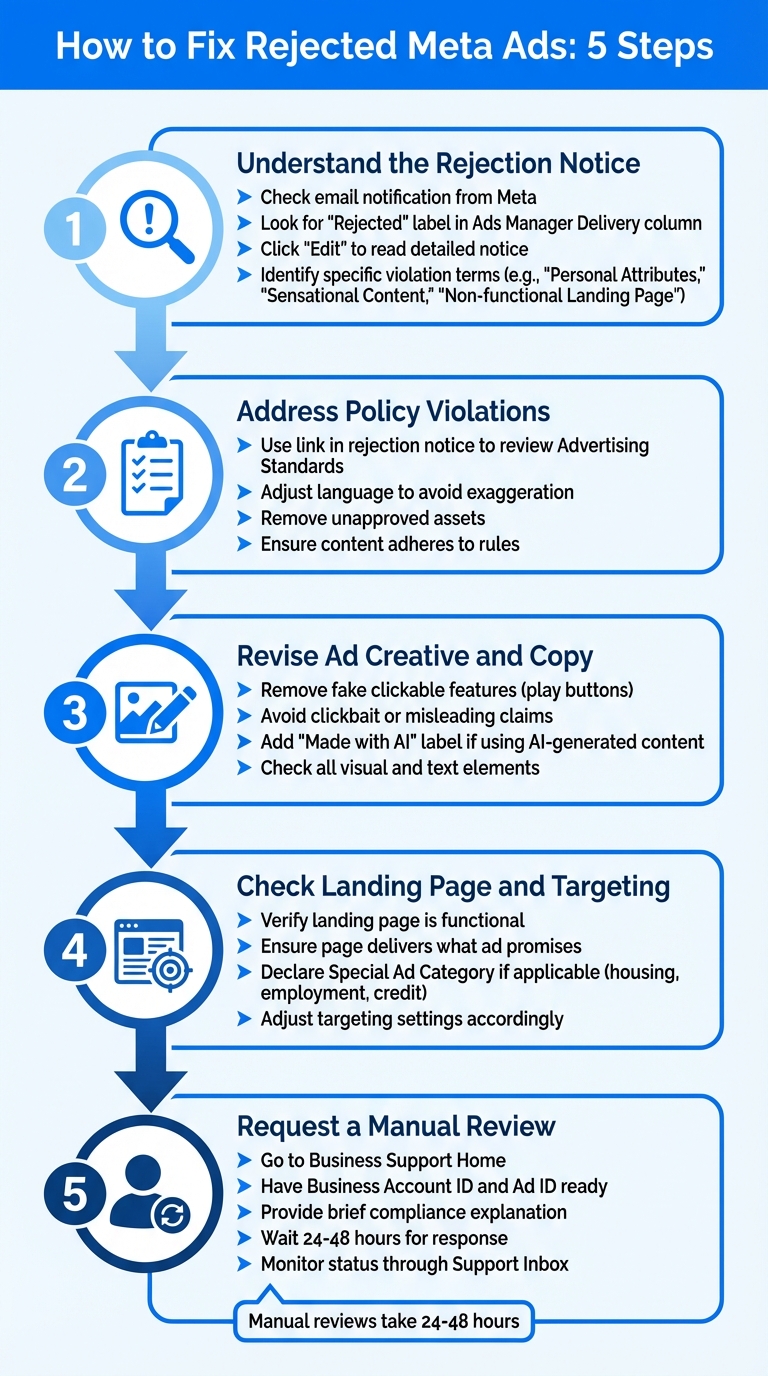
5-Step Process to Fix Rejected Meta Ads
When Meta rejects an ad, they send an email with a link explaining the violation. In Ads Manager, you'll see a "Rejected" label in the Delivery column. Click "Edit" to read the detailed notice [1][4][12]. Andrea Vahl, Co-author of Facebook Marketing All-in-One for Dummies, offers this advice:
"In Ads Manager, go to the ad level and click on Edit on your ad. Facebook will often tell you why the ad has been disapproved in a general sense." [12]
Pay attention to terms like "Personal Attributes", "Sensational Content", or "Non-functional Landing Page" to identify the issue. If the reason doesn't seem to apply - like a "Cryptocurrency" flag on an unrelated product - it might be an automated error. In such cases, you can request a manual review. Once you've pinpointed the issue, you can move forward with fixing it.
After identifying the problem, update your ad to align with Meta’s advertising policies. Use the link in the rejection notice to review their Advertising Standards [1]. Adjust your language to avoid exaggeration, remove any unapproved assets, and ensure your content adheres to the rules.
Double-check your ad for elements that might trigger rejection. For example, remove fake clickable features like play buttons. Avoid using clickbait or making misleading claims in your copy. If your ad includes AI-generated content, add a label such as "Made with AI" to ensure transparency [2][6].
Make sure your landing page is functional and delivers what the ad promises. If your ad falls under Special Ad Categories - like housing, employment, or credit - confirm that you've declared the correct category and adjusted targeting settings accordingly [3][5][11].
If you think the rejection was a mistake, you can request a manual review. Go to Business Support Home, and have your Business Account ID and Ad ID ready. Provide a brief explanation of how your ad complies with Meta's policies. Meta usually processes appeals within 24–48 hours [1][11]. You can monitor the status through your Support Inbox or Business Support Home. Keep in mind that if your ad is rejected again after a manual review, you won’t be able to appeal further for that specific ad.
Once you've addressed ad rejections, it's time to shift your focus to avoiding them in the future.
Conducting regular audits can help you catch potential issues before they escalate. Meta's Business Support Home includes an "Account Quality" section where you can monitor restrictions, disapproved ads, and appeal statuses. Ana Siu from Bïrch emphasizes the importance of this practice:
"Regularly check your account quality in the Account Overview on Meta Business Support Home. It provides a clear view of current restrictions, disapproved ads, and appeals, helping you catch issues early and avoid future restrictions." [2]
During these audits, review your landing pages, verify account settings, and keep an eye on patterns in creative approvals. Identifying what triggers filters can help you refine your approach. [15]
Meta frequently updates its advertising policies to address new technologies and safety concerns. This means an ad that passed review last month could be flagged today if the rules have changed. Meta underscores this point:
"Ads remain subject to review and re-review at all times, and may be rejected or restricted for violation of our policies at any time." [13]
To stay ahead, subscribe to updates from Meta for Business and bookmark the Meta Transparency Center. This is especially important with upcoming requirements like the 2025 AI content disclosure mandate [2]. Additionally, keep in mind that ads related to social issues, elections, or politics are archived in Meta's public Ad Library for seven years [14].
For a more thorough approach, combine your internal efforts with insights from industry experts.
Working with experts can help you maintain compliance and avoid unnecessary risks. Amy Bishop from Cultivative Marketing advises:
"If you want to get your ad up fast, don't take risks. If it has something that you sort of think might possibly be potentially offensive... don't try it." [16]
Specialized agencies like Dancing Chicken offer Meta Ads management services to help brands navigate compliance challenges. Their Growth plan includes bi-weekly ad creative production and a real-time analytics dashboard starting at $1,500/month. For larger needs, their Enterprise plan provides 24/7 priority team access and AI-powered lead qualification for $4,000/month. By leveraging compliance trackers and staying informed on policy updates, you can better predict and prevent issues with automated filters, reducing the likelihood of repeated rejections.
To fix rejected Meta ads, follow a clear and structured process. Start by reviewing the rejection notice in Business Support Home to identify the specific policy violation. From there, adjust your ad's image, copy, targeting, or landing page as needed, and resubmit it for a new automated review. If you’re confident the rejection was an error, request a manual review within 48 hours [7]. Keep in mind, your compliance history is cumulative, so every decision matters.
It’s important to address violations directly - simply deleting or duplicating a rejected ad won’t clear the record. Meta explicitly states that modifying or removing a rejected ad does not erase the violation from your account history. Repeated issues could lead to restrictions on your account [7]. Staying mindful of your account's compliance record is crucial to maintaining access and avoiding penalties.
Beyond fixing individual rejections, take time to understand Meta's advertising policies thoroughly. Meta reminds advertisers that "ads remain subject to review and re-review and may be rejected for violating our policies at any time" [17]. Regularly auditing your account and staying updated on policy changes can help prevent problems before they arise. Use the Account Quality dashboard to monitor disapproved ads and identify patterns that may require your attention.
For future campaigns, plan your ad submissions with enough time for possible revisions. While most ads are reviewed within 24 hours, manual reviews - especially for sensitive categories - can take up to 48–72 hours. This proactive approach not only resolves issues quickly but also sets the stage for long-term success.
If you need additional guidance or tailored strategies to optimize your Meta Ads, check out the experts at Dancing Chicken. They can help you navigate challenges and maximize your ad performance.
Meta ads can get rejected for a variety of reasons, usually tied to violations of their advertising policies. Here are some of the most common issues:
If your ad gets rejected, start by reviewing the specific policy mentioned in the rejection notice. Adjust your ad or targeting accordingly, and if you believe the rejection was a mistake, you can submit an appeal. Staying informed about Meta's policies is a smart way to avoid rejections in the future.
If your Meta ad gets rejected and you think it’s a mistake, you can challenge the decision by filing an appeal. Start by checking the rejection notice, which you’ll find in your email or Ads Manager. This notice will outline why your ad was flagged. Then, review Meta’s Advertising Standards or related policies to pinpoint the issue.
To submit an appeal, head over to the Business Support Home page and choose the Request Review or Appeal option. Clearly explain why you believe your ad aligns with Meta’s policies, and include any supporting evidence, such as screenshots or relevant documentation. Once submitted, Meta usually takes a few business days to review your appeal and will notify you of their decision via email.
If you’re feeling stuck or want professional help, Dancing Chicken provides consulting services and ad account audits to guide you through the appeal process and ensure your future ads comply with Meta’s rules.
To minimize the chances of your Meta ads being rejected, start by thoroughly reviewing Meta’s advertising policies. This ensures your content aligns with their standards. Your ad copy, images, and offers should be appropriate, truthful, and compliant with U.S. laws. If your ad falls under a Special Ad Category - like housing, employment, or credit - make sure to select the correct category in Ads Manager to avoid automatic rejection.
Pay close attention to your targeting settings by matching the ad’s location and language with the original post. When creating your ad, stick to Meta’s guidelines: avoid using too much text on images, steer clear of misleading claims, and make sure your content doesn’t include prohibited material. Before submitting your ad, take advantage of Meta’s ad preview tools to identify and fix potential issues.
For ongoing support and compliance, you might want to work with professionals like Dancing Chicken. They can audit your ad account, fine-tune your campaigns, and help ensure your ads meet Meta’s requirements. These steps can go a long way in reducing the risk of rejections.
When it comes to Meta ads, many brands don’t realize just how profitable the platform can actually be. Or even worse, an agency overpromised and underdelivered... leaving them frustrated with a fortune spent on ineffective campaigns.
Our clients see amazing results from Meta ads. That’s because we cover every angle—from targeted reach to dynamic creative testing to retargeting and more. With our full-funnel strategy and deep platform expertise, we make sure your Meta ads drive maximum profitability, every step of the way.
%20(1).png)
.svg)
