Digital Marketing
Meta Ad Image Compliance: Best Practices
Poorly crafted Meta ad images cost reach and risk account penalties—use correct specs, avoid prohibited content, and follow design best practices.
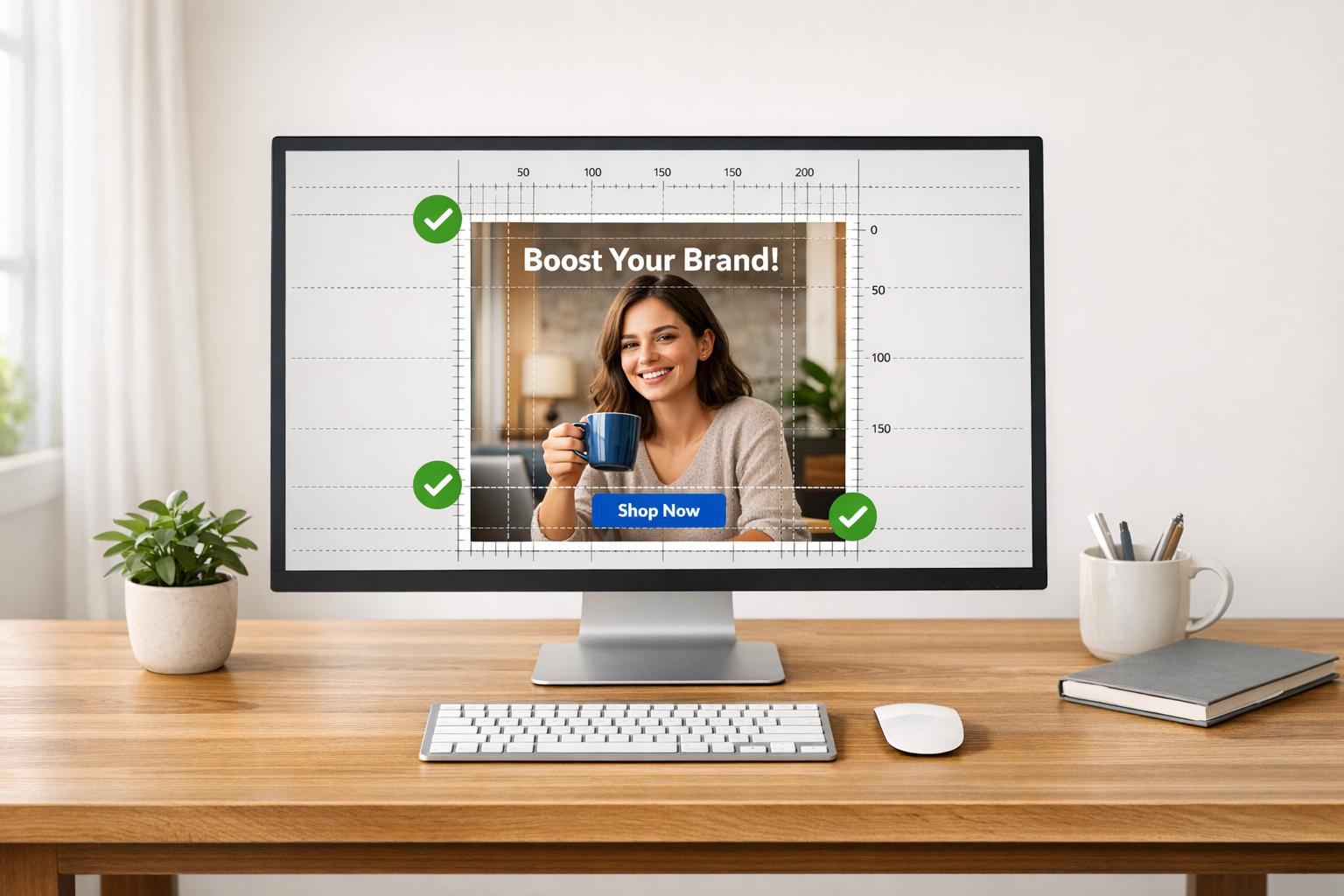
Running ads on Meta platforms without understanding compliance can lead to rejected ads, stalled campaigns, and wasted money. Repeated violations may result in higher costs, reduced ad delivery, or even permanent restrictions on your account. To avoid these issues, here’s what you need to know:
Meta's ad policies aim to protect users and ensure safe, transparent advertising. Ads must comply with Community Standards and avoid prohibited content like nudity, violence, or misleading imagery.
Prohibited content includes "before-and-after" images, personal attribute claims (e.g., "Are you diabetic?"), and broken or irrelevant landing pages.
Technical requirements: Use high-resolution images (minimum 1,080 x 1,080 pixels), recommended aspect ratios (e.g., 1.91:1 to 4:5 for Feed ads), and supported formats like JPG or PNG.
Design tips: Minimize text on images, avoid clickbait, and ensure your visuals align with your brand while appealing broadly.
Special categories (e.g., political, health, or financial ads) require additional compliance steps, such as disclaimers or age restrictions.
Always review your ads before submission and monitor your Account Quality to stay compliant. High-quality, policy-compliant ads are key to maintaining account health and achieving better results.
Meta's Image Compliance Policies: What You Need to Know
Meta's policies are designed to protect users and advertisers on platforms like Facebook and Instagram while also safeguarding businesses from fraud and discriminatory practices. According to Meta's Advertising Policy Principles:
"Our policies are guided by our company's core values and the following principles: Protecting people from unsafe and discriminatory practices, protecting people from fraud or scams, promoting positive user experiences, and promoting transparency." [1]
Understanding these policies is crucial - not just to avoid ad rejections but also to improve your campaign's performance. Ads that might not blatantly violate guidelines can still face reduced delivery or higher costs if flagged as lower quality. Meta enforces these standards through a mix of automated systems and over 15,000 human reviewers [5] [6].
Every ad must comply with Meta's Community Standards as a baseline [1] [5]. This review process examines all aspects of an ad - images, videos, text, targeting, and even the landing page. These rules directly influence how your ad images are evaluated.
Prohibited Content in Ad Images
Meta has strict rules about what can and cannot appear in ad images. Content featuring adult nudity, sexual activity, shocking violence, or illegal products (like weapons, tobacco, or illicit drugs) is strictly off-limits [1] [9]. Misleading imagery, like fake play buttons or icons, is also prohibited. Similarly, "before-and-after" weight loss images are banned because they can contribute to negative self-perceptions.
Additionally, images and text must avoid implying or asserting personal attributes such as race, religion, age, sexual orientation, disability, or financial status. As Meta states:
"Ads must not contain content that asserts or implies personal attributes. This includes direct or indirect assertions or implications about a person's race, ethnicity, religion, beliefs, age, sexual orientation... disability, physical or mental health." [1]
For example, avoid phrasing like "Are you a diabetic?" and instead focus on showcasing your product or service. Also, ensure your landing page is functional and relevant. Broken links, irrelevant content, or pages overloaded with pop-ups can lead to ad rejection [9].
Following these guidelines helps ensure your ad images contribute to a compliant and effective campaign.
Ad Review Process and Consequences of Violations
Meta enforces its policies through a detailed ad review process. While automated systems handle the bulk of the work - flagging over 90% of violative ads in under two minutes - human reviewers play a role in refining these systems and addressing specific cases [1] [3] [8]. Any changes to an ad, such as edits, new targeting, or billing updates, trigger a fresh review. Ads can also be re-reviewed at any time, and an advertiser's compliance history may influence the outcome [1] [3].
Violations can lead to various enforcement actions, depending on the severity and frequency:
Enforcement Action | Description | Impact on Advertiser |
|---|---|---|
Ad Rejection | The ad is disapproved and cannot run. | Campaign delays and the need for revisions or an appeal. |
Asset Restriction | Limits placed on ad accounts, Pages, or user accounts. | Certain assets become ineligible for advertising on Meta platforms. |
Account Suspension | Temporary or permanent disabling of the Business Account. | Loss of advertising privileges, requiring a formal appeal process. |
Performance Penalty | Ads flagged as lower quality face reduced delivery. | Higher costs and diminished reach due to lower-quality scores. |
If an ad is rejected, the Account Quality section provides details on the violation and allows you to request a manual review if you think there’s been an error [1] [7]. In 2024, the average appeal processing time ranged from 26 to 48 hours [8]. Keep in mind, any rejected ad that you edit and resubmit will be treated as a new submission and must go through the review process again.
For advertisers in the U.S., Canada, or parts of Europe running housing, employment, or credit ads, identifying as a Special Ad Category is required to comply with anti-discrimination laws [1] [8]. Similarly, political, social issue, and electoral ads are subject to additional scrutiny and are archived in Meta's public Ad Library for seven years [1] [10].
Technical Requirements for Meta Ad Images
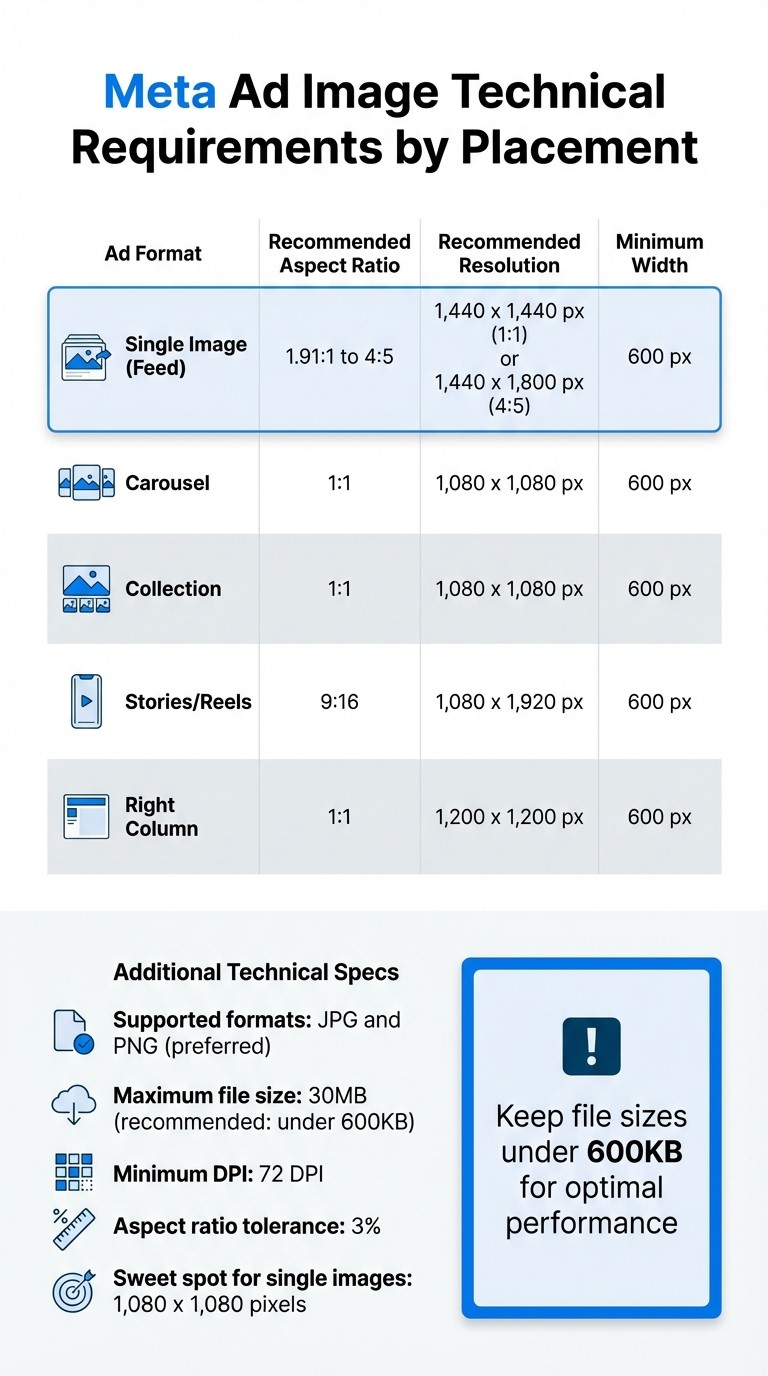
Meta Ad Image Technical Requirements by Placement
Getting the technical details right is key to ensuring your ad looks sharp and professional. Even if your content follows Meta's policies, failing to meet technical standards can lead to pixelation, awkward cropping, or slow loading times, all of which can hurt your ad's performance[14].
Meta officially supports JPG and PNG file formats for static images[11][12]. While other formats like BMP, WEBP, HEIC, and TIFF are technically accepted, JPG and PNG offer the best compatibility across placements. For images with text or sharp edges, PNG is the better choice as it avoids compression artifacts that can make your ad appear unpolished[11]. File sizes should not exceed 30MB, but keeping them under 600KB ensures faster loading and better performance.
Image Dimensions and Aspect Ratios
Different Meta ad placements demand specific dimensions to avoid distortion or cropping. Meta allows a 3% tolerance for aspect ratios[11][12], but exceeding this can result in key elements being cut off.
For single image ads in the Feed, the recommended aspect ratios range from 1.91:1 to 4:5. The ideal resolution is 1,440 x 1,440 pixels for a square (1:1) or 1,440 x 1,800 pixels for a vertical (4:5) image[11][12]. As Shea Karssing from Buffer highlights:
The sweet spot for single image ads is 1080 x 1080 pixels - that's a perfect square and works great in most places[11].
Square images are versatile and perform well across placements like Feed, Marketplace, and Right Column. For mobile optimization, the 4:5 aspect ratio takes up more vertical screen space, making your ad stand out in users' feeds.
Stories and Reels require a 9:16 aspect ratio with a resolution of 1,080 x 1,920 pixels[11]. Using a square image here will result in borders or awkward cropping. For carousel and collection ads, stick to a 1:1 aspect ratio with a minimum resolution of 1,080 x 1,080 pixels[11][12]. Across all formats, the minimum width is 600 pixels[11][13], but higher resolutions are recommended for sharper visuals on high-density screens.
Ad Format | Recommended Aspect Ratio | Recommended Resolution | Minimum Width |
|---|---|---|---|
Single Image (Feed) | 1.91:1 to 4:5 | 1,440 x 1,440 px (1:1) or 1,440 x 1,800 px (4:5) | 600 px |
Carousel | 1:1 | 1,080 x 1,080 px | 600 px |
Collection | 1:1 | 1,080 x 1,080 px | 600 px |
Stories/Reels | 9:16 | 1,080 x 1,920 px | 600 px |
Right Column | 1:1 | 1,200 x 1,200 px | 600 px |
File Formats and Resolution Standards
High-resolution images are essential for maintaining a professional appearance. Meta recommends a resolution of at least 72 DPI, with a preference for images that are 1,440 pixels wide or taller than 1,080 pixels[14][15].
Instagram will automatically crop images taller than a 4:5 ratio[13], and Facebook may center crop images to a 1.91:1 aspect ratio if flexible settings aren't enabled[13]. To prevent issues, keep critical elements - like logos or call-to-action text - away from the edges of your images. Always preview your ad across placements to ensure it looks good everywhere. What works in the Feed might not translate well to Stories, so it's worth double-checking before launching your campaign.
Design Best Practices for Compliant and Effective Ad Images
Once you've ensured technical compliance, it's time to focus on design elements that can make or break your ad's performance. Beyond just meeting Meta's requirements, your ad images need to grab attention and drive action. Meta's algorithms assess ad quality based on user feedback, such as "Hide ad" or "Report ad" clicks, and landing page bounce rates[2]. Ads flagged as low-quality lose competitiveness in auctions, which means higher costs and lower results.
Using Minimal Text on Images
Although Meta no longer enforces the "20% text rule", overloading your images with text can still harm engagement and delivery[17]. Meta favors visuals that instantly grab attention, leaving detailed messaging for the accompanying headline and primary text. Your image should communicate its main emotion or benefit at a glance, encouraging users to explore further.
Avoid clickbait phrases like "Click now before it's too late!" - Meta flags these as low-quality[17]. Instead, opt for language that’s clear and enticing, such as: "Exclusive offer - limited availability. Shop today!"[17]. The key is to make your value proposition obvious without resorting to tactics that might lead to unnecessary clicks. This approach helps maintain high-quality signals, keeping your ads competitive in auctions.
Balancing Brand Identity and Broad Appeal
Your ads should be unmistakably yours while still attracting a wide audience. Meta's Branding settings allow you to upload up to five logo variations, brand fonts, and three brand colors[16]. This ensures that even when AI-generated enhancements, like 3D animations or touch-ups, are applied, your visuals remain consistent with your brand.
Always use high-quality visuals. Blurry or poorly cropped images can not only turn users away but also risk ad disapproval[17]. Stick to the highest resolution possible - 1,440 x 1,440 pixels for square images and 1,440 x 1,800 pixels for 4:5 aspect ratios[12]. This ensures your ads look sharp and professional, while also maintaining consistency between your ad and its landing page.
Creating Images for Algorithmic Recognition
Meta's system evaluates the overall quality of your advertising account, including your Page, domain, and ad account. A single poorly performing ad can negatively affect the competitiveness of all your campaigns. To avoid this, ensure every creative variation you produce meets high standards.
Combat creative fatigue and avoid being flagged for duplicate content by developing distinct ad creatives instead of making minor tweaks to the same image. Meta's Advantage+ Creative enhancements can automatically add 3D animations, panning effects, and brightness adjustments[16]. Provide multiple variations - up to 10 primary texts and 10 headlines - to let Meta's algorithm optimize for what works best[16]. As Jon Loomer, founder of Jon Loomer Digital, explains:
The role of a Meta advertiser has evolved significantly during the past few years... Your focus should be on the ads themselves[16].
Before publishing, always use the Advanced Preview tool to check how your ads will appear across different placements[16]. By following these design best practices, you can align your creative efforts with compliance and maximize your campaign's performance.
Special Considerations for Regulated Advertising Categories
When it comes to regulated industries like politics, healthcare, finance, or social issues, advertising isn’t just about creativity and technical precision. Meta enforces stricter compliance rules, particularly for ad images, to safeguard users from misleading or inappropriate content. A single error could lead to ad rejections, public archiving, or even restrictions on your account[1][8]. These added rules build on existing guidelines to ensure a safer experience for both advertisers and users.
Political, Social Issue, and Electoral Ads
If your ads touch on politics or social issues, you’ll need to follow additional rules, starting with identity verification. Before launching any campaigns, you’re required to complete Meta’s authorization process at facebook.com/id. Plus, every ad must include a verified "Paid for by" disclaimer that clearly identifies the sponsor of the content[18][19]. This disclaimer isn’t just a formality - it’s displayed directly on your ad and added to Meta’s public record.
Meta also requires advertisers to disclose AI-generated or digitally altered photorealistic images, including deepfakes. According to Meta:
Advertisers must also disclose when a social issue, elections, or political ad contains a photorealistic image or video, or realistic sounding audio, that was digitally created or altered[19].
Skipping this step can lead to immediate rejections or penalties on your account.
Additionally, ad images must steer clear of questioning election legitimacy or making premature victory claims, especially in key regions like the U.S.[19]. All political and social issue ads are stored in Meta’s Ad Library for 7 years, along with data on ad spend and audience reach[1][18]. This creates a permanent, searchable record of your campaign. It’s also worth noting that political and social issue ads are banned in the European Union at this time[18].
Lead Ads and Data Collection Rules
Lead ads are a great tool for gathering user information, but they come with their own set of restrictions. Meta prohibits collecting sensitive data unless you have written permission. This includes information about health (both physical and mental), political views, race, religion, sexual orientation, financial details, criminal history, or account numbers[1][4]. Stick to prefilled fields for basic contact details.
If your business operates in the health and wellness sector, your ad images need to avoid promoting negative self-image or unattainable body ideals. For example, before-and-after photos or anything that could be seen as body shaming are not allowed[1][10]. Instead, focus on promoting positive lifestyle changes. Ads for weight loss, cosmetic procedures, or financial services must also target audiences 18 years or older[1][10].
Regulated Category | Key Image Restriction | Mandatory Requirement |
|---|---|---|
Political / Social Issues | Disclosure of AI/digitally altered photorealistic images | Verified "Paid for by" disclaimer[18] |
Health & Wellness | No "perfect body" claims or negative self-perception triggers | 18+ age targeting[1] |
Lead Ads | No questions about health, race, or political affiliation | Written permission for sensitive data[4] |
Conclusion
Getting your Meta ad images and content right goes beyond avoiding rejections - it’s crucial for maintaining account health and improving your advertising ROI. Repeated violations can label your account as lower quality, which drives up costs and reduces your ad reach[2].
Meta typically reviews ads within 24 hours[1], so staying compliant ensures your campaigns keep running smoothly. Stick to high-resolution images (at least 1,080 x 1,080 pixels for most placements), minimize text, and steer clear of sensational clickbait[2]. Make sure your landing page aligns with your ad’s promise - no pop-ups or misleading claims[17].
If you’re operating in regulated categories like political ads or lead generation, the rules are even stricter. You’ll need verified disclaimers, age-appropriate targeting, and careful management of sensitive data to stay compliant.
Keep an eye on your Business Support Home and track metrics like "Hide ad" clicks or high bounce rates to ensure you’re meeting Meta’s standards. Following these technical and design guidelines helps your campaigns perform effectively.
For personalized strategies and expert advice on Meta ads, check out Dancing Chicken. Using these tips can help you protect your ad account and improve your campaign outcomes.
FAQs
Why was my Meta ad image rejected even though it looks fine?
Your Meta ad image might have been rejected due to a violation of the platform's policies, even if it looks acceptable to you. Common reasons include low-quality visuals, misleading elements, or content that doesn't align with Meta's community standards. These issues are flagged during Meta's ad approval process to ensure all ads follow their advertising guidelines.
What’s the safest image size for most placements?
The safest image size to use for most placements is at least 1080 x 1080 pixels. This helps ensure your ad displays correctly and aligns with Meta's ad policies across different placements.
How can I appeal a rejected ad and avoid repeat violations?
To challenge a rejected ad, first, carefully examine the reason for the rejection. Adjust your ad content or landing page to align with Meta’s policies, then submit it again for review. To avoid similar issues down the line, make sure all your ads adhere to Meta’s advertising guidelines and routinely check your campaigns for any potential concerns.
Related Blog Posts
Meta Ads Compliance: Essential Rules for 2025
How to Fix Common Meta Ad Policy Violations
5 Common Meta Ad Policy Violations to Avoid
How To Fix Rejected Meta Ads