Digital Marketing
Meta Ads Automation: Dynamic Bidding Tips
Learn setup, Advantage+ configuration, automated rules, DCO integration, and metrics to optimize Meta Ads dynamic bidding for lower CPA and higher ROAS.
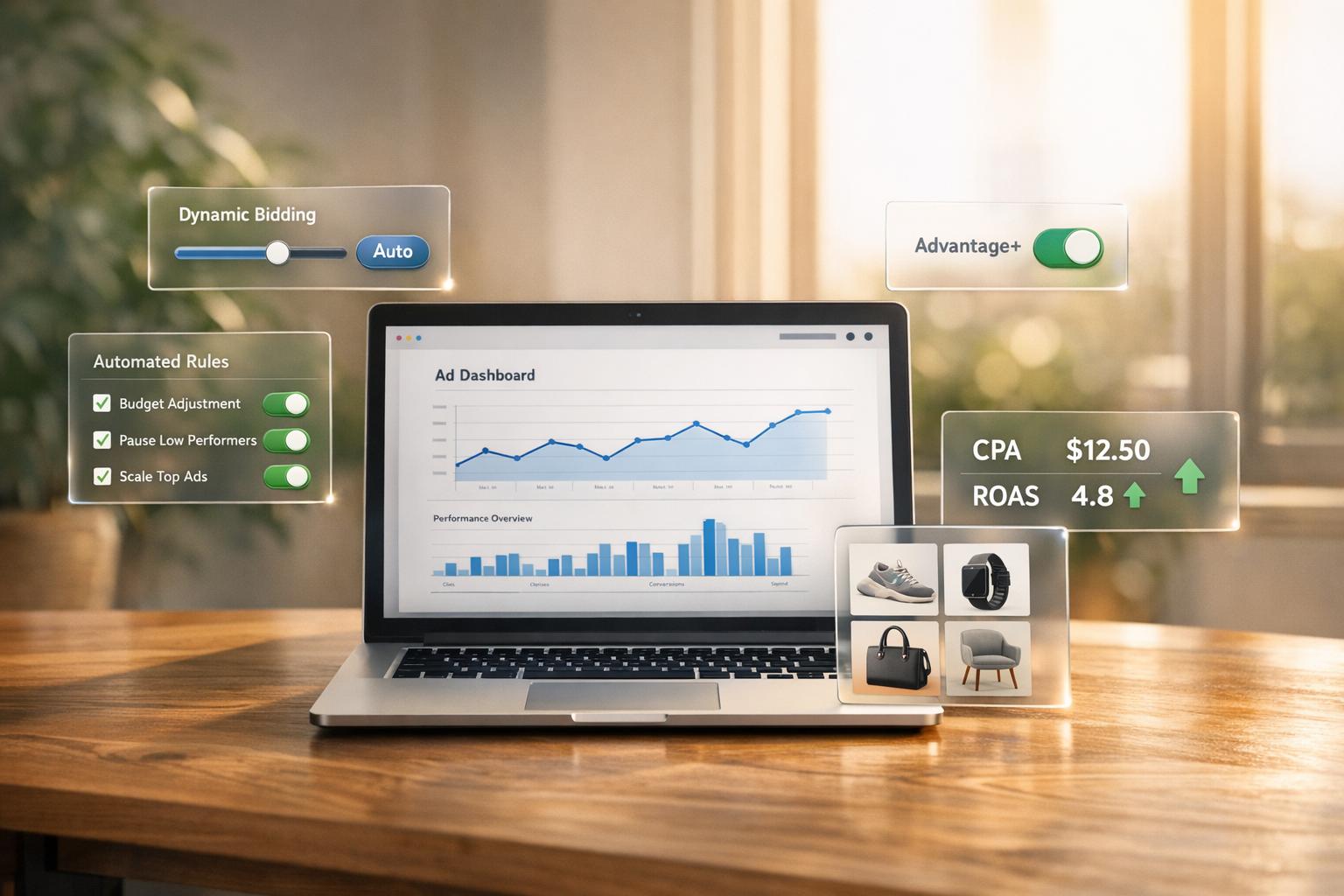
Dynamic bidding in Meta Ads uses AI to adjust bids in real time, delivering better results than manual management. It factors in ad quality, user feedback, and likelihood of action to calculate "Total Value", meaning even lower bids can win auctions if the ad is relevant. Here’s what you need to know:
Why it works: Automation processes thousands of data points daily, outperforming manual adjustments.
Setup essentials: Use tools like Meta Pixel and Conversions API, ensure a $50+ daily budget, and allow 50 optimization events per week for better performance.
Best practices: Consolidate ad sets, use Advantage+ campaigns, and enable automated rules to optimize bids and budgets efficiently.
Metrics to monitor: Keep track of ROAS, CPA, and audience overlap to refine campaigns.
Dynamic bidding saves time, reduces costs, and improves results - but it needs accurate data and proper setup to succeed.
Setting Up Meta Ads for Dynamic Bidding Automation
To make the most of dynamic bidding, you need a solid setup to ensure real-time bid optimization works as intended. Start by implementing reliable tracking tools like the Meta Pixel and Conversions API. These tools capture user actions and feed performance data directly to the algorithm, which then adjusts bids in real time based on this information [1][7]. Without accurate tracking, the system essentially operates blind, potentially wasting your budget with minimal returns.
Another critical factor is ensuring your conversion volume meets the required threshold. For automated scaling to work effectively, set a daily budget of at least $50 [6]. Operating with a lower budget can fragment your data, slowing down the algorithm’s learning process and reducing its effectiveness.
If you’re using a Cost Cap strategy, give the algorithm some flexibility. Set your cost cap 20–30% higher than your target CPA [1]. This approach allows the system to seize valuable conversion opportunities in competitive auctions. Overly tight constraints can force the algorithm to skip these opportunities, ultimately reducing your total conversions.
Once these steps are in place, move on to configuring Advantage+ campaigns to fully utilize Meta’s automation capabilities.
Configuring Advantage+ Campaigns
Advantage+ campaigns are Meta's most advanced automation tool, but they require precise setup to function at their best. To unlock the full potential of Advantage+, you need to enable three key features: Advantage+ campaign budget, Advantage+ audience, and Advantage+ placements [9]. Skipping any of these will reduce the effectiveness of the automation.
Start by selecting the correct campaign objective. Choose OUTCOME_SALES for e-commerce, APP_INSTALLS for mobile apps, or OUTCOME_LEADS for lead generation [9]. These objectives activate the AI-driven optimizations that power dynamic bidding. At the budget level, select LOWEST_COST_WITHOUT_CAP as your bid strategy to give the algorithm the freedom to find conversions efficiently [9][11].
For audience settings, enable Advantage+ audience and avoid imposing strict demographic or interest constraints [5][9]. The system uses real-time behavior analysis to identify high-value users, and manual restrictions can limit its ability to uncover unexpected opportunities. If you're running e-commerce campaigns, connect a product catalog with at least 10 products to unlock dynamic ad formats [5][6].
Additionally, define your existing customers using Custom Audiences. This allows you to control retention spending and focus on attracting new prospects [9][11].
"Advantage+ campaigns offer a full-funnel marketing approach that leverages machine learning to automate the entire campaign process... it combines audience targeting and creative testing into one fluid, adaptive system." – Brigid Healy, AdVenture PPC [8]
Structuring Campaigns for Automation
Once your Advantage+ campaigns are configured, focus on structuring them to maximize data aggregation. Consolidate ad sets into fewer, larger campaigns to improve data collection and optimization [1]. Running too many small, micro-targeted ad sets with minimal budgets fragments your data, making it harder for the system to allocate spending effectively.
Enable Advantage+ Campaign Budget at the campaign level. This feature allows Meta to dynamically distribute your budget across ad sets based on real-time performance [1][5]. On high-opportunity days, the system can spend up to 75% more than your daily budget to capture better results, as long as your weekly spend stays within seven times your daily budget [10].
Stick to 3–5 ads per ad set to ensure there’s enough data for the algorithm to learn effectively [12]. Use strict audience exclusions to avoid overlap - for instance, exclude retargeting audiences from prospecting campaigns. This prevents ad sets from competing with one another, which could inflate costs and confuse your attribution data.
Finally, set up automated rules to serve as safety nets. For example, establish maximum daily spend limits at two to three times your typical budget to prevent runaway costs during scaling [1]. Meta allows up to 250 automated rules per advertiser account [7], giving you plenty of flexibility to create safeguards without micromanaging every detail. Allow the algorithm at least seven days to gather data and stabilize before making manual adjustments [6]. Rushing this process can lead to costly mistakes.
Creating and Managing Automated Rules for Dynamic Bidding
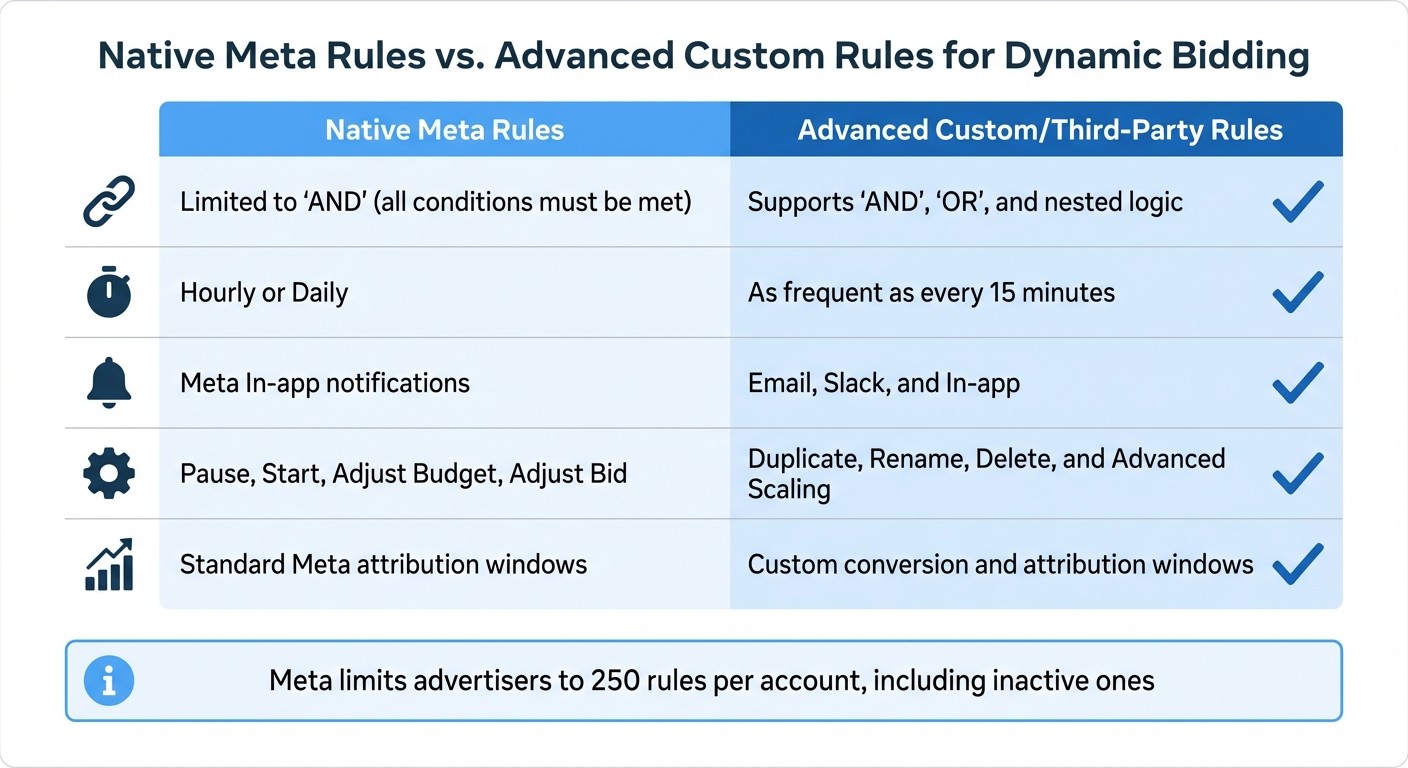
Native Meta Rules vs Advanced Custom Rules Comparison for Dynamic Bidding
Automated rules are a powerful way to keep your bids optimized without constant manual intervention. Each rule has three essential parts: a condition that determines when the rule activates, an action that adjusts bids or budgets, and an asset like a campaign or ad set where the rule applies [13]. These rules work around the clock, responding to performance changes in real-time, making them an essential tool for dynamic bidding.
How to Build Automated Rules in Meta Ads
To get started, head to Facebook Ads Manager and navigate to All Tools > Automated Rules [13][15]. Choose the asset level (campaign, ad set, or ad) where you want the rule to apply. For bid adjustments, you can select actions like "Increase the rate by", "Reduce the rate by", or "Scale rate by target field" [13]. Define the conditions using key metrics such as CPA, ROAS, CPC, or CPM. Use a 3-7 day window for data evaluation to avoid reacting to daily fluctuations [14][1].
Before activating a rule, set it to "Send notification only" mode first. This allows you to test the rule and see when it triggers without affecting your live campaigns [13][14]. Once you're confident the rule is working as intended, switch to automated actions. Always include safety measures like budget caps or bid ceilings to avoid overspending if a rule triggers multiple times [14][1].
It's also crucial to set a minimum data threshold before any rule takes action. For example, only allow budget adjustments after an ad set has at least 5-10 conversions. Acting on too little data, like 1-2 conversions, can lead to erratic results. You can also layer rules: increase the budget if CPA is below 80% of the target, hold if it's between 80-120%, and decrease if it exceeds 120% [14]. Lastly, avoid conflicts between "Start" and "Pause" rules to prevent ads from toggling on and off repeatedly [16].
"Automated rules transform budget management from daily chore to systematic optimization." – ROASPIG [14]
Comparison: Default Meta Rules vs. Advanced Custom Rules
Meta's built-in rules are simple and effective, but advanced third-party tools offer more flexibility. Here's a quick comparison:
Feature | Native Meta Rules | Advanced Custom/Third-Party Rules |
|---|---|---|
Logic Operators | Limited to "AND" (all conditions must be met) [16] | Supports "AND", "OR", and nested logic [16] |
Check Frequency | Hourly or Daily [1] | As frequent as every 15 minutes [16] |
Notification Channels | Meta In-app notifications [16] | Email, Slack, and In-app [16] |
Available Actions | Pause, Start, Adjust Budget, Adjust Bid [13] | Duplicate, Rename, Delete, and Advanced Scaling [16] |
Attribution Control | Standard Meta attribution windows [16] | Custom conversion and attribution windows [16] |
While Meta's rules are sufficient for most advertisers, advanced platforms provide greater customization but require API integration and more setup time [1]. Keep in mind that Meta limits advertisers to 250 rules per account, including inactive ones [13], so focus on rules that drive the most impact.
Best Practices for Automated Rule Management
When launching a new ad set or making significant edits, protect the first 7 days to allow the algorithm time to optimize [1][4][14]. Schedule regular reviews - daily or weekly - for underperforming campaigns, and avoid premature adjustments that could disrupt the learning phase. Use consistent naming conventions like [Action] - [Condition] - [Level] (e.g., "PAUSE - No Conversions $100+ - AdSet") to keep your rule library organized [14].
If rules are triggering too often, causing erratic budget changes, consider raising performance thresholds or extending the evaluation window [1]. Use the Rule Logs in the automation section to review activity weekly or monthly, identifying any outdated thresholds or seasonal mismatches [16][14][17].
For example, in 2024, the beauty booking platform Treatwell used Meta's automation tools to refine their ad campaigns, achieving a 28% reduction in cost per acquisition [4]. This shows how well-structured rules, combined with regular monitoring, can lead to tangible improvements in ad performance.
Combining Dynamic Creative Optimization with Bidding Strategies
What is Dynamic Creative Optimization?
Dynamic Creative Optimization (DCO) leverages machine learning to test and mix creative elements, serving ads tailored to individual preferences. By uploading a variety of assets - say, 10 images or videos and 5 headlines - Meta’s algorithm dynamically combines them to find the most effective pairings. It considers factors like demographics, interests, and device type to deliver the best-performing ad for each user [18].
"Think of it as having a team of mini-ad testers constantly running, learning, and adapting in real-time." – Adynext [18]
As of June 2024, Meta retired the standalone "Dynamic Creative" toggle for Sales and App Promotion objectives. Instead, they now recommend the "Flexible Ad Format" to achieve similar automation [20][23]. This shift allows DCO to produce up to 30 creative combinations - something nearly impossible to manage manually while also juggling dynamic bidding [18][20]. This automated testing aligns perfectly with integrating creative optimization and bidding strategies.
Integrating DCO with Dynamic Bidding
Combining DCO with dynamic bidding takes ad performance to the next level. While dynamic bidding adjusts bids in real time, integrating DCO ensures the creative content itself is optimized. Together, they enhance ad relevance and bidding efficiency. DCO identifies which creative combinations drive the most clicks and conversions, feeding that data into the bidding algorithm. This process helps optimize for lower costs per acquisition (CPA) and higher returns on ad spend (ROAS) [18][21]. Meanwhile, automated bidding ensures the best-performing ads reach the right audience segments by managing auction dynamics and budget allocation [18][19].
For example, in 2025, Spanish agency FEEDB<CK used a DCO strategy that included nearly 2,000 tailored ad variations with localized targeting. The result? A 58% boost in ROAS and a 30% drop in CPA [21]. Similarly, US-based jewelry brand Roma scaled their Facebook ads using dynamic templates and automated creative production, achieving a 120% increase in ROAS [21].
To get the most out of this strategy, consider these tips:
Upload modular assets that can seamlessly work together.
Set daily ad set budgets for better control.
Cap bids at 70–80% of your target cost-per-purchase.
Limit ad frequency to 3–4 impressions per week.
Refresh top-performing combinations every 21–28 days [20][22].
Monitoring and Refining Dynamic Bidding Performance
Key Metrics to Monitor in Dynamic Bidding
Keeping track of the right metrics can make or break your campaign. Two of the most critical ones are Return on Ad Spend (ROAS), which measures how much revenue you generate for every dollar spent, and Cost Per Action (CPA), which tells you the cost of each conversion, whether it’s a purchase, sign-up, or another goal [3]. These should always be front and center in your Ads Manager dashboard.
Meta also provides an Opportunity Score, which evaluates how well your campaign aligns with their platform recommendations [24]. Another key metric is Learning Phase Progress, which shows the percentage of your budget spent during the learning phase over the last week. A high percentage here means your bidding strategy may still need additional data to stabilize [24].
Don’t overlook Audience Overlap, which helps identify if your ad sets are competing against each other for the same audience. This internal competition can drive up costs and hurt efficiency [24]. To dig deeper into performance, use the "Customize columns" feature in Ads Manager. This allows you to break down data by age, placement, device, and time, making it easier to pinpoint which segments are delivering the best results [24].
Metric | Definition | Why it Matters for Dynamic Bidding |
|---|---|---|
ROAS | Revenue / Ad Spend | Measures the profitability of automated bidding [3] |
CPA | Total Cost / Conversions | Ensures bid costs stay within profitable limits [3] |
Opportunity Score | Meta's internal health score | Shows how well the campaign aligns with Meta’s best practices [24] |
Learning Phase % | % of spend in learning | High percentages indicate the bidding strategy isn’t fully optimized yet [24] |
Audience Overlap | Internal competition rate | Helps prevent ad sets from competing against each other [24] |
By keeping an eye on these metrics, you’ll have the insights needed to fine-tune your campaigns for better results.
Making Ongoing Improvements
Using real-time data, you can refine your automated bidding with both precision and strategy. Start by establishing a baseline - export 30–60 days of historical data to define acceptable CPA, ROAS, and conversion rates [1]. This baseline will help you avoid overreacting to daily fluctuations. Remember, ad sets need at least 50 conversions per week for reliable optimization. Anything less won’t give you enough data to make informed decisions [1].
Be on the lookout for red flags. For example, if your CPA exceeds the target by 40% or your ROAS drops 30% below your goal, it’s time to intervene [1]. Keep an eye on frequency metrics too. A frequency higher than 4 often signals audience fatigue, which can lead to declining performance [14].
To balance costs and conversions, consider setting a Cost Cap that’s 20%–30% above your target CPA [1]. For campaigns performing well - think ROAS above 3x and a click-through rate (CTR) over 1.5% - scale budgets cautiously, increasing them by 20%–25% every 3–5 days to maintain stability [25]. On the flip side, if a campaign is underspending (using less than 80% of its budget), adjust or remove bid caps incrementally by 5%–10% [25].
You can also set up tiered automated rules to manage performance at different levels. For instance:
Scale budgets if CPA is less than 0.8x your target.
Maintain budgets if CPA is between 0.8x and 1.2x.
Reduce budgets by 25% if CPA exceeds 1.5x your target [14].
Use evaluation windows of 3–7 days for these rules. Shorter windows (like 1 day) can lead to overreacting to noise, while longer ones (30 days) might miss real trends [14]. For example, a direct-to-consumer skincare brand improved its ROAS by 38% in just four weeks by switching to "ROAS Goal" targeting and using historical data to set realistic benchmarks [25].
"Rules augment your judgment - they don't replace it. Review rule activity weekly, adjust thresholds as markets change, and keep your strategic oversight." – ROASPIG [14]
Don’t forget to check your Account Overview page regularly for alerts like ad rejections or payment issues. Meta’s automated recommendations can also provide useful insights [24]. Even with automation, A/B testing remains essential. Experiment with different headlines, images, and audience segments to give the AI fresh data to work with [3]. While AI handles the mechanics of bidding, human expertise is still crucial for strategic planning, creative direction, and recognizing long-term trends like seasonality [3].
Working with Experts for Dynamic Bidding
Automated rules and data-driven adjustments can do a lot for your campaigns, but adding expert guidance into the mix can take your results to the next level.
How Dancing Chicken Can Help
Scaling dynamic bidding effectively requires deep platform knowledge and tried-and-tested strategies. That’s where Dancing Chicken shines. They’ve managed $1.7M in Meta Ads spend in just 30 days, generating $7.3M in returns with an impressive average ROAS of 4.3X [26].
Their process kicks off with a thorough ad account audit to identify untapped revenue opportunities. From there, they align dynamic bidding strategies across the entire buyer journey - covering everything from initial reach to retargeting. This ensures automation works hand-in-hand with your funnel goals, directing budgets toward the highest-performing segments.
Their track record speaks volumes. For instance, within just two weeks of launching a Meta Ads strategy, they helped Baja Construction land a $100,000 project. Shiptronics achieved top market positioning with their guidance, and over a five-year collaboration with Coach B Training, they drove over 400 webinar signups per session through automated lead generation systems.
This level of expertise doesn’t just improve bidding strategies; it also fine-tunes the entire campaign funnel, leading to measurable and sustained improvements.
Benefits of Partnering with Experts
Working with experts means skipping the costly guesswork. Michael from Campbell & Company put it best:
"We have tried countless agencies, most overpromise and always underdeliver... Mason is awesome! They overdeliver every time. You have found the right people" [26].
Expert partners do more than manage bids - they bring in automation frameworks powered by data to optimize your entire marketing funnel. This includes dynamic creative testing, advanced audience segmentation, and real-time performance tracking, all designed to sharpen your bidding strategy.
Dancing Chicken’s results back this up: the average cost per conversion across their managed accounts is $12.23. By starting with an ad account audit, they ensure campaigns are built on a strong foundation, avoiding the risk of amplifying inefficiencies as budgets grow [26].
Conclusion
Dynamic bidding automation in Meta Ads has become essential for businesses aiming to stay competitive. According to recent data, the cost efficiency gap between automated and manual accounts has grown significantly - from 10–15% two years ago to a staggering 30–50% today [2]. Modern AI systems can process massive amounts of data and adjust bids in real time, outperforming any manual approach.
To make the most of these advanced tools, it's important to start with the basics. Focus on core practices like bid management and budget pacing before introducing more advanced features, such as dynamic creative testing and audience expansion. Setting budget limits and using rolling averages can help balance out daily fluctuations effectively [8,30].
While automation handles the heavy lifting, your overall strategy still plays a key role. High-quality creative, well-structured campaigns, and thoughtful strategic planning are essential - automation can't compensate for weak fundamentals.
Whether you're managing campaigns on your own or partnering with experts like Dancing Chicken, success isn't about spending more; it's about running campaigns efficiently through real-time, automated decisions [2]. Regularly reviewing and fine-tuning your approach ensures these systems deliver the best possible results. By applying these strategies carefully and monitoring performance, you can achieve noticeable gains in ROI and campaign effectiveness.
FAQs
How do I know my tracking is good enough for dynamic bidding?
To make sure your tracking works seamlessly with dynamic bidding, start by ensuring your Meta Pixel is properly set up. Focus on tracking the most important conversion events, as these will directly impact your campaign's success. Lastly, double-check that performance data is being collected and analyzed correctly - this is key to fine-tuning your campaign’s automation and maximizing results.
When should I use Cost Cap vs Lowest Cost in Meta Ads?
Using Cost Cap helps you keep a firm grip on your average cost per result, making it a great option when you’re aiming to scale campaigns while maintaining consistent performance. On the other hand, if your main goal is to maximize volume and you’re less concerned about strict cost limits, Lowest Cost is the way to go.
What automated rules prevent overspending without killing performance?
Automated rules are a smart way to keep your ad spending in check. They work by pausing or adjusting campaigns as soon as certain budget limits are hit. This means your ads won't overspend, and performance stays on track since the system tweaks or stops them automatically when costs go beyond the set boundaries.
Related Blog Posts
Top 7 Meta Ads Strategies for Scalable Offers
Meta Bid Strategies Explained: Pros and Cons
What Are Meta Ads Automated Rules?
Meta Ads KPIs for Multi-Objective Campaigns