How to Plan Meta Ads Budget for Long-Term ROAS

Planning your Meta Ads budget for consistent returns requires a clear strategy that aligns with Meta's algorithm and your business goals. Here's how you can do it:
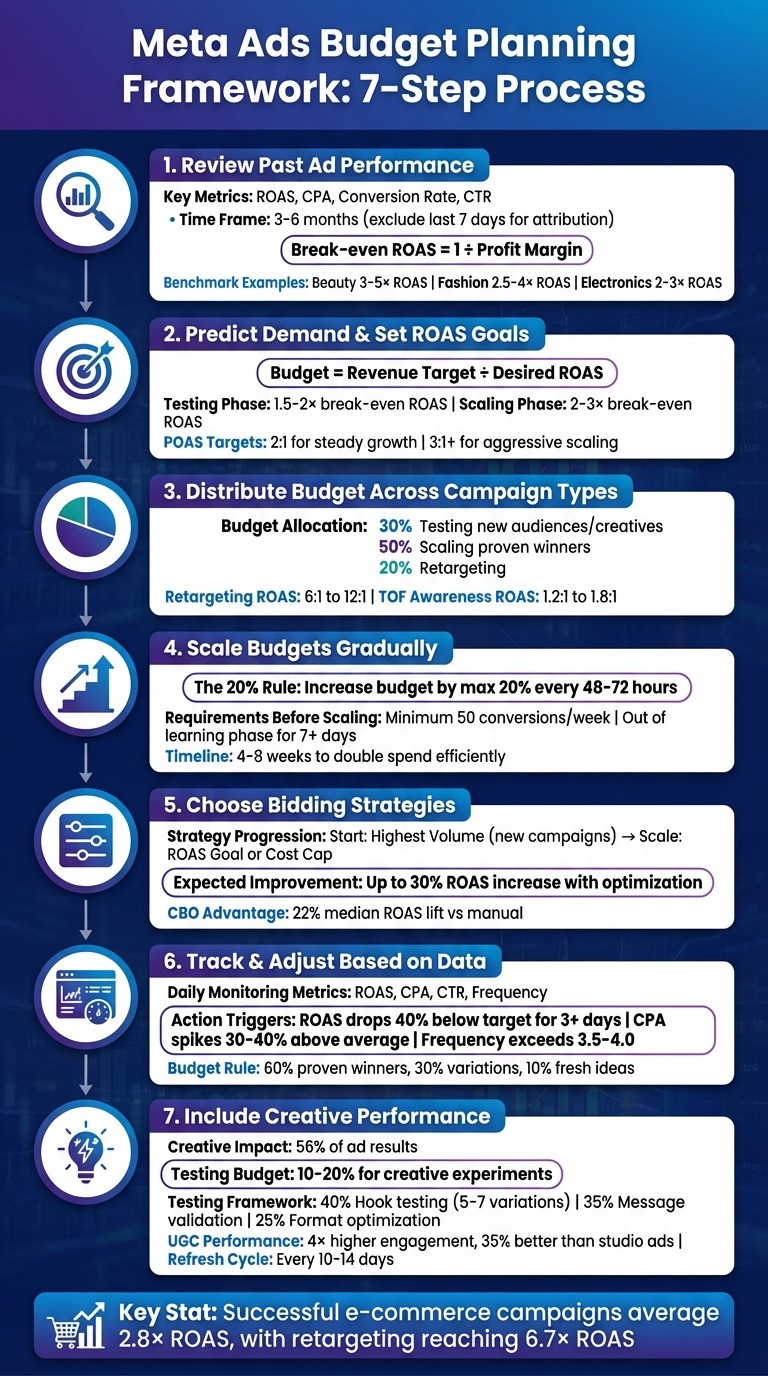
Stability is key: Avoid sudden budget changes. Meta's algorithm performs best with steady campaigns that generate at least 50 conversions per week.
Analyze past performance: Review 3–6 months of data, focusing on ROAS, CPA, and conversion rates. Exclude the last 7 days to ensure complete attribution.
Set realistic goals: Calculate break-even ROAS and use it to define targets for testing (1.5–2x) and scaling (2–3x).
Distribute budgets wisely: Allocate funds across awareness (30%), scaling proven campaigns (50%), and retargeting (20%).
Scale gradually: Increase budgets by no more than 20% every 48–72 hours to maintain algorithm efficiency.
Optimize bidding strategies: Start with "Highest Volume" for new campaigns, then shift to "ROAS Goal" or "Cost Cap" as you scale.
Test creatives regularly: Dedicate 10–20% of your budget to testing new ads. Focus on formats like videos or user-generated content for better engagement.
7-Step Meta Ads Budget Planning Framework for Long-Term ROAS
Step 1: Review Your Past Ad Performance
Before planning future ad budgets, take a deep dive into your past campaigns. This step is essential to build a solid foundation for achieving long-term ROAS (Return on Ad Spend). By analyzing historical data, you can establish a performance baseline that helps guide your decisions moving forward.
To ensure you're capturing all relevant data, make sure both the Meta Pixel and Conversions API are in place. Without these tools working together, browser restrictions and privacy settings might create blind spots in your tracking. This could make your historical ROAS look worse than it actually is [9].
When reviewing past data, exclude the last seven days to allow for complete conversion attribution. Meta's attribution windows mean that some conversions take up to a week to fully register [8]. By waiting for this "data maturity", you’ll avoid making decisions based on incomplete numbers.
Find Your Key Performance Metrics
Start by gathering the core metrics from the past 3–6 months. Focus on ROAS, cost per acquisition (CPA), conversion rate, and click-through rate (CTR). These numbers give you a clear picture of what "normal" looks like for your account and help you spot any variations in performance.
One critical calculation is your break-even ROAS, which you can find using this formula: 1 ÷ Profit Margin [5]. Any campaign performing below this threshold is costing you money. For campaigns to justify increased budgets, they should consistently deliver at least 30% above break-even ROAS over a period of several days [10].
"Your Facebook ads budget isn't a gamble. It's a formula. Work backward from your revenue goals and understand your true break-even points." - Bixente, Co-founder, Trendtrack [5]
Compare your performance metrics to industry benchmarks to see how you're doing. For example, in 2026, Beauty & Skincare brands typically achieve a 3–5× ROAS, D2C Fashion averages 2.5–4×, and Electronics sits at 2–3× due to tighter margins [9]. These benchmarks can highlight areas where your creative, targeting, or offer strategy might need improvement before scaling your budget.
Additionally, check your Event Match Quality score in Meta Events Manager. Aim for a score of 6.0 or higher. This score reflects how well customer data (like emails or phone numbers) matches with Meta accounts, which is crucial for accurate targeting [9].
By understanding these metrics, you can better predict demand and set realistic yet ambitious ROAS goals.
Spot Seasonal Trends
Your past ad performance isn’t static - it changes with seasonal trends, and recognizing these fluctuations is key to smarter budget allocation. Analyze your data month by month to identify when ROAS peaks and when it dips.
For instance, Q4 typically delivers the highest returns, with ROAS climbing to 4:1–5:1 during the holiday season as consumer demand surges. However, CPMs (cost per thousand impressions) also rise significantly, ranging from $3.00 to $8.00. While efficiency improves, you'll need larger budgets to maintain reach [5]. On the flip side, Q1 is often slower, with ROAS dropping to 1.8:1–2.2:1 and CPMs falling to $0.50–$1.50. This makes Q1 a great time to test new creatives and audiences at a lower cost [5].
Beyond calendar-based trends, look for patterns of declining performance caused by repeated exposure to the same ads. Historical data often shows that performance drops every 7–14 days as audiences grow tired of seeing the same creative [9]. If you notice falling CTRs and rising CPCs on this timeline, plan for regular creative updates - not just for your media spend but also for ongoing creative production to keep performance steady.
Also, take note of any spikes tied to events like promotions, product launches, or sales. These moments might call for lifetime budgets instead of daily budgets, allowing Meta to spend more aggressively during high-interest periods [4]. Recognizing these patterns ensures you’re not wasting money during slow periods or missing opportunities during high-demand windows.
Step 2: Predict Demand and Set ROAS Goals
Use past performance data to create clear revenue and ROAS (Return on Ad Spend) targets that align with your business goals.
To determine your budget, divide your revenue target by your desired ROAS. For instance, if you need $50,000 in revenue and are aiming for a 2.5:1 ROAS, you’d need to allocate $20,000 for ads. Alternatively, if you’re working from sales volume, multiply the number of required sales by your estimated Cost Per Acquisition (CPA) to calculate the necessary budget [12][5].
ROAS targets should vary based on the stage of your campaign. During initial testing, aim for 1.5 to 2 times your break-even ROAS. Once you’ve identified successful campaigns, scale them with a target of 2 to 3 times your break-even ROAS [5].
The Efficiency Paradox
As you increase ad spend, your ROAS will naturally decrease. This happens because platforms like Meta initially target high-intent audiences, but as those audiences are exhausted, the ads must reach broader, less engaged groups to maintain volume [5][1]. Instead of seeing this decline as a failure, incorporate it into your forecasting to set realistic expectations.
Beyond setting basic targets, consider long-term profitability by factoring in customer value.
Factor in Customer Lifetime Value (CLV)
For businesses with repeat purchases or subscription models, initial ROAS can be misleading. A campaign might seem unprofitable at first glance but deliver significant long-term value when you account for Customer Lifetime Value (CLV).
Take a subscription brand as an example: acquiring customers at a 1.2:1 ROAS might look like a loss initially. However, if those customers stay subscribed for an average of 8 months, the lifetime ROAS could jump to 9.6:1 [5]. This is why many subscription-based businesses now rely on cohort-based budgeting, which tracks customer value over time instead of focusing solely on the first purchase.
When setting ROAS targets for businesses with high CLV, prioritize acceptable acquisition costs over immediate returns. Determine how much you can afford to spend upfront while ensuring long-term profitability. It’s also worth tracking POAS (Profit on Ad Spend) as an alternative to ROAS. POAS, calculated as Gross Profit divided by Ad Spend, accounts for all associated costs - like product, shipping, and fees - so you’re not unknowingly scaling at a loss [5]. Aim for a 2:1 POAS for steady growth and above 3:1 for aggressive scaling [5].
Consider External Influences
Adjust your targets further by factoring in external events and trends. Holidays, promotions, product launches, or major cultural events can all impact performance significantly.
If you’re gearing up for a big sale or product launch, allocate a higher budget during these periods. Use lifetime budgets instead of daily budgets to allow platforms like Meta to spend more aggressively when interest peaks. On the flip side, during slower periods, reduce ad spend and focus on testing new creative ideas instead of scaling.
Keep an eye on broader economic conditions, too. Inflation, changes in consumer confidence, or shifts in your industry can all influence conversion rates and average order values. Regularly review these factors and adjust your ROAS targets as needed - what worked six months ago might not be feasible today.
Step 3: Distribute Budget Across Campaign Types
Once you've set your ROAS targets, the next step is to allocate your budget across different campaign types. This step builds on your analysis of past performance and ROAS projections, setting the foundation for effective scaling.
Split Budget Between Awareness, Consideration, and Conversion
Using your revenue forecasts and seasonal trends as a guide, allocate your budget to support a full-funnel marketing strategy. Avoid focusing solely on bottom-of-funnel retargeting campaigns. While these campaigns can deliver impressive ROAS - typically between 6:1 and 12:1 [5] - their audience pool is limited and can be quickly exhausted.
A more balanced strategy involves investing in top-of-funnel (TOF) awareness campaigns, which drive long-term growth. Although these campaigns often show lower initial returns, usually between 1.2:1 and 1.8:1 [5], they play a critical role in expanding your audience. Many successful brands use the Stable Core, Flexible Edge model [10]. This approach ensures consistent funding for proven, high-performing campaigns (the "Core") while allocating a smaller portion of the budget to experiment with new creatives and audiences (the "Flexible Edge").
A good starting point for budget allocation might look like this:
30% for testing new audiences and creatives
50% for scaling proven winners
20% for retargeting[1]
These percentages can be adjusted based on your brand's maturity. For example, newer brands may need to dedicate more budget to testing, while established brands can focus more on scaling.
Once you've divided your budget across funnel stages, it's time to pick the right optimization method to bring your strategy to life.
Apply Campaign Budget Optimization (CBO) and Ad Set Budget Optimization (ABO)
Meta provides two main ways to manage campaign budgets: Campaign Budget Optimization (CBO), now called Advantage Campaign Budget, and Ad Set Budget Optimization (ABO). Choosing the right method can make a big difference in your campaign's performance.
CBO operates at the campaign level, allowing Meta’s AI to allocate your budget dynamically to the ad sets most likely to convert. This hands-off approach is ideal for scaling. According to Meta, Advantage+ Budget Allocation can increase median ROAS by 22% and lower cost per purchase by 18% [2]. Advertisers who switched to CBO reported an average 17% increase in ROAS within six weeks [15].
"For growth-focused brands, use CBO. The algorithm distributes your budget to what performs best, adjusts in real time, and removes manual guesswork." - Bixente, Co-founder, Trendtrack [5]
On the other hand, ABO gives you manual control, letting you set specific budgets for each ad set. This method works well during testing phases when you want to ensure that each audience or creative gets equal attention. ABO is particularly useful when testing vastly different audience sizes, such as a small retargeting list versus a large cold audience, or when you need strict control over spending on specific segments [13][14].
A hybrid approach often yields the best results: start with ABO to test and identify winning ad sets, then move those winners into a CBO campaign for scaling [13][14]. This method combines the precision of manual testing with the automation and efficiency of CBO. Just keep in mind that CBO performs best when there's enough data for the algorithm to work effectively [14].
Step 4: Scale Budgets Without Hurting Performance
Once you’ve established your budget strategy and optimization methods, the next step is to grow your spending carefully. Scaling too fast can disrupt Meta’s algorithm and hurt your Return on Ad Spend (ROAS). On the flip side, scaling too slowly means leaving potential growth on the table. The trick is to expand your reach methodically while keeping performance steady.
Increase Budgets Gradually
Using the data you’ve collected, you can scale effectively - but only after ensuring your campaigns have enough conversion events. A common rule of thumb here is the "20% rule": increase your budget by no more than 20% every 48 to 72 hours [6][10]. This gradual approach prevents Meta’s algorithm from going back into the learning phase, which can cause delivery issues and performance dips. Incremental growth keeps things stable, while sudden spikes can throw everything off balance.
"Scaling Meta Ads budgets is kind of like feeding a sourdough starter: add too much too fast and you'll ruin the batch, add too little and nothing rises." – Yolanda Williams, Take Flight Marketing [16]
Before scaling, ensure your campaign hits at least 50 conversions per week and has been out of the learning phase for at least seven days [2][3]. Without these benchmarks, scaling attempts are 73% more likely to fail in the first week [3].
When you’re ready to scale, make adjustments early in the day to give Meta’s algorithm a full 24-hour cycle to adapt [10]. Avoid making major changes between late Friday and Sunday, as weekend traffic tends to be less predictable [10]. If your ROAS remains stable for three consecutive scaling cycles, you can cautiously move to 30% increases [17].
Keep in mind that performance may dip temporarily - typically for 3 to 5 days - as the algorithm recalibrates [10]. Doubling your ad spend while maintaining efficiency is a gradual process that can take 4 to 8 weeks [6], so patience is essential.
After making budget changes, shift your attention to tracking key performance metrics.
Closely Monitor Performance Metrics
As you scale, focus on ROAS trends over a 3- to 5-day period instead of reacting to daily fluctuations. Establish clear thresholds: for instance, only scale up if your ROAS is 30% above target for three consecutive days. Conversely, if ROAS drops 40% below target for three or more days, reduce your budget by 10–20% [10].
Pay attention to ad frequency as well. If it exceeds 2.5 to 3.0 in prospecting campaigns, pause any further scaling and work on broadening your audience [10]. Similarly, if you see a spike in CPM alongside a decline in CTR, it’s a sign of audience fatigue - scaling further may not be effective.
Another key metric is your Cost Per Acquisition (CPA). Ensure CPA remains at least 20% below your maximum threshold before increasing your budget. To safeguard performance, set up automated rules. For example, configure rules to pause ad sets if CPA rises 30–40% above your target, or to increase budgets by 15% when ROAS exceeds 3x your goal.
Finally, avoid making simultaneous changes to your creative elements and budget. If performance drops, you’ll want to know exactly what caused the issue, and making too many changes at once makes that impossible [10].
Step 5: Choose Bidding Strategies for Consistent Returns
Once you've nailed down your budget distribution and scaling plans, it's time to fine-tune your bidding strategies. These strategies determine how your budget is spent and directly impact your ROAS (Return on Ad Spend). The right choice hinges on your campaign's current phase - whether you're still gathering data or shifting focus to profitability. Picking the wrong strategy or timing a switch poorly can either drain your budget or disrupt your campaign's momentum. So, let’s break down the options.
Pick the Right Bidding Method
Meta offers several bidding strategies, each designed for specific goals. Here's a closer look:
Highest Volume: This is Meta's default option and the best starting point for new campaigns. It prioritizes gathering baseline performance data and maximizing conversions [18].
Highest Value: Ideal for e-commerce campaigns with varying price points, this strategy seeks out high-spending customers rather than simply maximizing conversions. As Meta's Business Help Center puts it:
"Maximizing value of conversions could lead to a higher average cost per result... this type of optimization is about finding the purchase... likely to get you the highest value... not finding the least expensive" [20].
Cost Cap: If protecting your margins is critical, this strategy sets a maximum CPA (Cost Per Action) while still allowing higher bids in valuable auctions. It keeps costs predictable without sacrificing opportunities [19].
ROAS Goal: Also called Minimum ROAS, this option focuses on maintaining a specific average return. For example, setting a goal of 1.100 aims to generate $110 in purchases for every $100 spent. Be cautious, though - setting the goal too high can halt delivery, leaving your budget untouched [11].
Bid Cap: The strictest option, this strategy sets a hard limit on what you’ll pay in any single auction. While it gives you tight control, it often leads to under-spending and requires a deep understanding of your conversion rates and profit margins [18].
Advertisers who refine their bidding strategies can see up to a 30% increase in ROAS [19]. Here's a quick comparison to help you choose:
Bidding Strategy | Primary Goal | Budget Utilization | Best For |
|---|---|---|---|
Highest Volume | Maximize conversion count | Aims to spend full budget | New campaigns, lead generation |
Highest Value | Maximize total revenue | Aims to spend full budget | E-commerce with varied price points |
ROAS Goal | Maintain specific return | May not spend full budget | Profitability-focused scaling |
Cost Cap | Control average CPA | May not spend full budget | Scaling while maintaining efficiency |
Bid Cap | Limit auction bid | Often results in under-spend | Advanced advertisers with strict margins |
Once you've decided on your bidding method, it's time to set precise ROAS targets to keep things on track.
Set Target ROAS Bids
When setting your ROAS target, aim for a number just below your historical average. This gives your campaign enough flexibility to compete in auctions [11]. Setting an overly aggressive target can backfire, halting delivery altogether. Jon Loomer, founder of Jon Loomer Digital, advises:
"Highest Volume is the best place to start with a new campaign or product. Once you get results over time, you can make decisions regarding a bid strategy that might get you better results" [18].
Expect some ROAS fluctuations during the first three days, especially for campaigns impacted by iOS 14.5+ updates. Avoid making adjustments during this learning phase, as it can reset the algorithm and delay results [11] [10].
Once the learning phase wraps up, let the system stabilize your ROAS. If performance deviates significantly for several days, you can then fine-tune your targets. Keep in mind that ROAS-based bidding requires your Meta Pixel or SDK to accurately report transaction values [18]. Double-check your tracking setup before switching from volume-based to value-based bidding.
With your bidding strategy locked in, the next step is to focus on continuous data monitoring to keep your campaigns performing at their best.
Step 6: Track and Adjust Campaigns Based on Data
Once you've set your bidding strategy, the work doesn't stop there. To protect your return on ad spend (ROAS), you need to keep a close eye on performance. Skipping this step could mean wasted budget. The trick is to establish a daily monitoring routine while basing decisions on 3–5 day trends instead of reacting to short-term fluctuations [10]. This approach allows for thoughtful budget adjustments.
Monitor Core Metrics Daily
Keep tabs on your key metrics every day, but avoid making hasty changes based on a single day's data. Focus on these critical indicators: ROAS, CPA, CTR, and frequency. If you notice ROAS dipping 40% below your target or CPA climbing 30–40% above average for three consecutive days, it's time to act [10][2].
Pay special attention to frequency. When it exceeds 3.5–4.0 and conversions plateau, it signals audience fatigue [10][21]. Instead of throwing more money at the problem, consider expanding your targeting or refreshing your creative assets. Also, remember that data takes time to settle. For campaigns using a 7-day click attribution window, exclude the most recent days from your analysis since conversions might still be coming in [8].
One common pitfall is chasing high engagement without considering its impact on conversions. For example, a supplement e-commerce brand learned this the hard way in late 2025. After launching six new ads, their ROAS plummeted from 1.35 to 0.75. Meta's algorithm prioritized an ad with a 44% hook rate but a $68 CPA, sidelining a proven performer with a $43 CPA. The result? An $18,000 loss. They paused all ads for 24 hours, relaunched only the proven concepts, and saw their ROAS recover to 2.5 within five days [21]. As Rahul Mondal from Ideon Labs explains:
"Meta's algorithm in 2026 optimizes for predicted conversions, but it heavily weights engagement signals during learning phases... High engagement ≠ high conversions" [21].
To avoid manual errors, use Meta Ads Manager's automated rules. For example, set rules to pause ad sets if CPA exceeds your goal by 40% or if ROAS drops below your profitability threshold [10][6]. This ensures consistent decision-making without emotional interference.
Metric | Purpose | Warning Sign |
|---|---|---|
ROAS | Measures overall profitability | Drop of 40%+ below target for 3+ days [10] |
CPA | Measures acquisition efficiency | |
CTR & CPC | Gauges creative effectiveness | CTR below baseline after 48–72 hours [21] |
Frequency | Tracks audience saturation |
When these metrics hit their thresholds, shift your focus from monitoring to reallocating your budget.
Move Budget Away from Underperforming Ad Sets
Before making decisions, ensure ad sets have at least 1,000 impressions and 10–15 conversions [21][2]. If CTR stays below your baseline after 48–72 hours, or CPA is double your target after 15 conversions, pause the ad set and redirect its budget [21].
Follow the 60-30-10 rule to manage your budget effectively: allocate 60% to proven winners, 30% to variations of those winners, and 10% to fresh creative ideas [21][1]. This balanced approach minimizes risk while allowing room for testing. When scaling a winning ad, increase the budget by no more than 10–20% every 48–72 hours to avoid restarting the learning phase [10][1].
Meta's automated rules can simplify budget redistribution. You can configure rules to pause underperforming ad sets and shift their budgets to top performers [7]. Depending on your goals, choose between even distribution (equal splits), proportional (favors high-volume performers), or inverse proportional (prioritizes lower-cost ad sets) [7].
Avoid making simultaneous changes to budget and creative. If performance drops, you won't know which adjustment caused the issue [10]. Also, check for audience overlap between campaigns and use exclusions to avoid competing against yourself [10]. Advertisers using Meta's Advantage+ Budget Allocation have reported a median ROAS of 5.0 compared to 4.1 with classic CBO, reflecting a 22% lift [2].
Step 7: Include Creative Performance in Budget Planning
To maintain and improve your long-term ROAS, it's not enough to focus solely on data-driven budgeting and bidding strategies - you also need to factor in creative performance. Creative quality plays a massive role in ad outcomes, accounting for 56% of the results, which surpasses the impact of bid strategies or targeting combined [24]. With Meta's AI-driven optimization tools like Advantage+ automating much of the tactical work, creative content has become the primary driver for consistent ROAS. As Paul Grisel, Founder of VIDEOAI.ME, emphasizes:
"Your creative matters more than how much you spend or who you target" [23].
This underscores the importance of setting aside a portion of your budget specifically for creative testing and updates. Without fresh content, even the best-performing ads tend to lose their effectiveness, with engagement dropping 20–30% each week as they near the end of their lifecycle [24].
Prioritize Top-Performing Creatives
To maximize results, you need to zero in on the creatives that deliver. Focus on metrics like Thumb-Stop Rate (3-second views divided by impressions), Outbound CTR (clicks to your landing page), and Cost per Result. Look for ads with a hook rate of at least 30% and 10–15 conversions over a 5–7 day period before scaling them into broader campaigns [22][23]. Interestingly, only 1 to 3 out of every 10 creatives typically emerge as top performers [24]. This means a small number of ads will drive most of your success, making it essential to allocate the bulk of your budget to these proven winners while continuing to test new variations on a smaller scale [24].
Diversifying your portfolio of strong-performing ads is also key. Relying too heavily on a single "hero" ad can be risky. When transitioning a winning creative from a test campaign to a scaling campaign, keep the same Post ID to retain likes, comments, and other forms of social proof [24].
Test Different Creative Formats
Testing new creative formats is just as important as scaling existing winners. Allocate 10–20% of your ad budget specifically for creative experiments [24]. To avoid spreading your budget too thin, test in small groups of 3–5 variations at a time, ensuring each creative gets a minimum spend of $100–$150 to collect meaningful data [24].
A 3-layer testing framework can help you refine your process:
Hook Testing: Spend 40% of your testing budget experimenting with 5–7 different opening seconds.
Message Validation: Use 35% of the budget to pair winning hooks with different value propositions.
Scale Optimization: Dedicate 25% to testing format variations like video, carousel, or static images [23].
User-generated content (UGC) ads deserve special attention. These types of ads often generate 4x higher engagement compared to polished brand content and can outperform studio-produced ads by 35% [23]. Consider testing UGC formats like testimonials, before-and-after clips, or montages that highlight social proof. Keep in mind, though, that UGC creatives have a shorter lifespan, typically lasting only 14–18 days before fatigue sets in. Plan to refresh or rotate them every 10–14 days [23].
To avoid wasting budget, set automated rules to pause creative tests once they reach 3x your target CPA without a conversion [24]. This ensures you're not throwing money at ads that clearly aren't working while still giving promising ones enough time to shine. In fact, one study found that a single ad can outperform another by 19x simply because of stronger creative appeal - not just 19% better, but nineteen times better [24]. This highlights why systematic creative testing can often deliver more impact than tweaking your bid strategies.
Conclusion
This guide has walked through actionable steps, from analyzing data to experimenting with creative testing, to help you make the most of your Meta Ads budget and drive long-term ROAS gains. The key takeaway? Your budget isn’t just a number - it’s a signal to Meta’s algorithm. As LeadEnforce aptly states:
"Your budget is not just a lever - it's a signal to Meta's system. Treat it with care." [10]
To scale effectively, rely on data and only increase budgets when your ROAS is consistently 30% above your target. Stick to the 20% budget adjustment rule to maintain algorithm stability and prevent disruptions in performance, which often take 3–5 days to recover from [10]. Also, ensure your campaigns generate at least 50 conversion events per week, as this is the minimum threshold Meta’s algorithm needs to optimize efficiently [25].
The Stable Core, Flexible Edge model offers a balanced approach. Dedicate about 55% of your budget to campaigns that are proven performers, while using the remaining portion to test new audiences and creative approaches. This allows you to explore new opportunities without jeopardizing your baseline ROAS [25].
Focus on multi-day trends rather than making hasty decisions based on short-term results. By analyzing patterns over 3–5 days and systematically testing creative elements, you can set up a framework that delivers consistent returns. For context, successful e-commerce campaigns on Meta typically achieve an average ROAS of 2.8x, with retargeting campaigns reaching as high as 6.7x - results that depend on giving the system enough time to learn and optimize [25].
For more advanced strategies and tailored solutions, check out the resources available at Dancing Chicken.
FAQs
What’s the best way to calculate my break-even ROAS?
To figure out your break-even ROAS (Return on Ad Spend), simply divide your total revenue by your total ad spend. This calculation shows the exact ROAS you need to cover all your costs and avoid running at a loss.
For instance, let’s say you spend $1,000 on ads and bring in $1,000 in revenue. In this case, your break-even ROAS would be 1.0. If your ROAS is above 1.0, you’re making a profit. If it’s below 1.0, you’re operating at a loss. Knowing this number is key to setting achievable goals and scaling your campaigns in the right direction.
What are the most effective ways to test new Meta ad creatives?
To effectively test new Meta ad creatives, start with a clear plan that prioritizes understanding what grabs your audience's attention while keeping your campaigns stable. Focus on testing big changes - like visuals, headlines, hooks, or formats - so you can gather meaningful data. Avoid tweaking minor details during this stage.
Conduct these tests in separate ad sets or campaigns to ensure they don’t interfere with your current performance. Leverage tools like Meta’s A/B Testing or Dynamic Creative Optimization (DCO) to simplify the process and get reliable results. For added stability, duplicate your top-performing ad sets and replace the creatives without adjusting other variables.
Let your tests run for at least 4-7 days to collect enough data and track metrics such as ROAS, CTR, and engagement. Once you find winning creatives, scale them thoughtfully. To keep your campaigns fresh and avoid ad fatigue, update your creatives every 2-4 weeks.
How can I adjust my Meta Ads budget to make the most of seasonal trends?
To make the most of your Meta Ads budget during seasonal trends, it’s all about smart planning and gradual scaling. Boost your budget during high-demand times like holidays or sales events, but keep in mind that ad costs often rise during these periods. For major shopping events like Black Friday, consider breaking your budget into phases - such as testing, pre-event preparation, and peak days - to get the best results.
Take advantage of automation tools and data insights to adjust your budget in real-time. Historical trends and performance metrics can guide your decisions. When scaling, stick to safe practices by increasing your budget incrementally - no more than 20–25% at a time - to keep your campaigns running smoothly.
By thinking ahead, using automation, and scaling carefully, you can seize seasonal opportunities without compromising your campaign’s performance.